


Posted: 7/24/2025 7:14:53 AM EDT
|
I have a sprinkler system that uses wifi to connect to the internet. it apparently has a known issue where it drops wifi continuously after a year or so of operation. mine is doing that now. if you power cycle it connects again for a while then drops. what I would like to do is remove the wifi chip and solder in an ethernet port. but don't know if it is a simple as that. |


|
Originally Posted By Andrewh: I have a sprinkler system that uses wifi to connect to the internet. it apparently has a known issue where it drops wifi continuously after a year or so of operation. mine is doing that now. if you power cycle it connects again for a while then drops. what I would like to do is remove the wifi chip and solder in an ethernet port. but don't know if it is a simple as that. Either set it on a plug that is wifi connected with an app so you can turn it off and on again from the couch, or just have it power cycle during the day when you aren't watering. A Walgreens light timer box will do that just fine. Or get a new system that does the same thing. I doubt there will be an ethernet solution, pool and sprinkler systems are in harsh environments that sort of rule out a regular network cord setup. I may look up "your sprinkler system" and "security" and see if there isn't some sort of chinese schennanigans going on. You may not want it anymore depending on what you find there. |
Compassion for the guilty is cruelty to the innocent.

|
As others stated, there's no way you can convert that to ethernet that makes any sense. You'd have to design a brand new board, new firmware, etc. It would be very time consuming. If you have the knowledge, you can create a new device yourself, using a Rasp Pi, Arduino, etc. and writing a bit of code. But that's not trivial either. |
Gun control is not the answer. Gun control is the question. The answer is NO.
|
Originally Posted By Andrewh: Rachio 3 Originally Posted By Andrewh: Rachio 3 Originally Posted By wheel: As others stated, there's no way you can convert that to ethernet that makes any sense. You'd have to design a brand new board, new firmware, etc. It would be very time consuming. If you have the knowledge, you can create a new device yourself, using a Rasp Pi, Arduino, etc. and writing a bit of code. But that's not trivial either. The Type 1GC that runs that does have integrated ethernet in addition to Wifi but it's unlikely the firmware was written to take advantage of that. You could make a "socket adapter" for that IC that would break out the interface pins, but: #1 - I wouldn't want to be reflowing that package and #2 - You would still need to reverse engineer the PCB and write your own firmware (which would probably be simple for this product since the fancy bits are on the phone app). https://www.murata.com/products/productdata/8813651361822/type1gc.pdf It would be your MII/RMII pins: 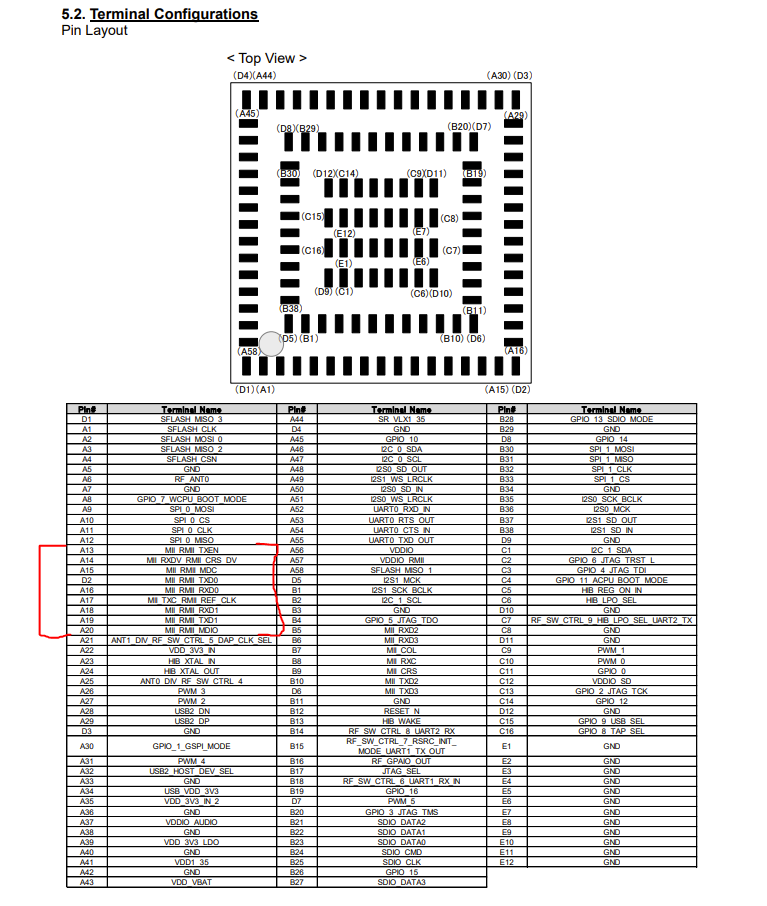 Is there any pattern to the disconnect issue? Can you force it through some environmental factor like temp? ETA: The easiest DIY solution would probably be to use one of the network/web PLCs that have some IO and relays. You can use it as a simple remote switch or by using control logic. All of the hardware, firmware and timing is abstracted for you. https://controlbyweb.com/original-webrelay-quad/ https://controlbyweb.com/x400/ A Pi with a relay hat (or triacs if they have them) would work with some actual programming. |
|
thanks, couldn't find the circuitboard anywhere. but at the price of the relay, I would just replace the unit with someone else's and leave this mess behind. no, I don't see a pattern. it has lived through 2 years of summers, so it isn't the heat. I have a unif wifi adapter, that is hard wired above it, just to give wifi in the garage. that is still functioning because I have a security camera that is wifi in the garage as well. all the other camera's are hard wired so I put a poe switch in to power the unifi disc for lack of a better word. I didn't check the timing, but I know my wife was complaining it wasn't online so I used the smart switch to turn it off and back on, and when I went out about an hour later it was offline again. |
| Can you open it up? Or are there vents? Maybe a can of air and clean it out a bit might help. If there is debris or something in it sometimes even just shaking it a bit moves the stuff to somewhere it won't cause problems. |
Compassion for the guilty is cruelty to the innocent.

I'll slay anything that's evil, that's my deal!
Joined:
Mar 2006
Posts:
13444
EE: 100% (63)
 PA, USA
|
You mentioned Unifi. Is band steering turned on? My IOT devices HATE band steering with the unifi stuff. Create a new SSID and VLAN specifically for IOT devices. Turn off band steering Connect the Rachio to that SSID |
Sure, I've been called a xenophobe, but the truth is, I'm not. I honestly just feel that America is the best country and the other countries aren't as good. That used to be called patriotism.

|
Originally Posted By hellbound: You mentioned Unifi. Is band steering turned on? My IOT devices HATE band steering with the unifi stuff. Create a new SSID and VLAN specifically for IOT devices. Turn off band steering Connect the Rachio to that SSID Good suggestion. OP, you might want to check 2.4ghz interference as well as DHCP address conflicts. |
God's children are not for sale.

|
Originally Posted By hellbound: You mentioned Unifi. Is band steering turned on? My IOT devices HATE band steering with the unifi stuff. Create a new SSID and VLAN specifically for IOT devices. Turn off band steering Connect the Rachio to that SSID Good suggestion and yes it will play havoc with certain IoT devices. Unifi in general is not exactly the most IoT friendly system in the world. |
I'm not the one REEING, motherfucker! -FCSD2162
|
I had turned off band steering originally. verified it is still off. did a scan and not much going around near it. most channels show half or less. verified it is on 2.4 I have the 5 labeled differently. going through their trouble shooting covers most of this. one thing they say is The RSSI value of -74 indicates a weaker signal, but RSSI value only goes down to -67 if you enable min rssi value on the unifi. it is sitting about 2 feet above it on a metal shelf, so not sure what I can do to make it better. I can move it closer and rest it on top. |
I'll slay anything that's evil, that's my deal!
Joined:
Mar 2006
Posts:
13445
EE: 100% (63)
PA, USA
|
some of my IOT stuff has "terrible" RSSI values... three of my ring floodlight cams are at -76, -76, -81. I can connect to them right now and stream HD video. my rainbird sprinkler controller on 2.4ghz is at -87, but I just got the irrigation finished notification, and I connected to it just fine and manually turned on zone 1. If you have any sort of minimum RSSI threshold, turn it off. |
Sure, I've been called a xenophobe, but the truth is, I'm not. I honestly just feel that America is the best country and the other countries aren't as good. That used to be called patriotism.
|
oddly the rssi threshold was off. I turned it back on and it has stayed connected for nearly 3 hours now. it may have nothing to do with it. maybe causing it to have a fixed channel helped. made too many changes to be sure, but will keep an eye on it to see if it drops again. could even be the forced reboot of the unifi device that caused it to stay connected as well. though I have a camera on it as well I could still get to. so not sure. |
|
I run 3 SSID's with a corresponding VLAN Main IoT (2.4 only, no WAN) Guest (limited to 20mbps) That way you can tune each SSID without sacrificing features because IoT really likes vanilla 2.4ghz And I turn off daily channel optimization. If you live in a really crowded wifi environment there is some benefit to it but in normal residential areas having stable signal is more beneficial. |
I'm not the one REEING, motherfucker! -FCSD2162
|
Originally Posted By Andrewh: oddly the rssi threshold was off. I turned it back on and it has stayed connected for nearly 3 hours now. it may have nothing to do with it. maybe causing it to have a fixed channel helped. made too many changes to be sure, but will keep an eye on it to see if it drops again. could even be the forced reboot of the unifi device that caused it to stay connected as well. though I have a camera on it as well I could still get to. so not sure. I'd be curious what the ambient temp is of the Unifi AP.. they run pretty hot to begin with, and get absolutely retarded when temps get really high. |
God's children are not for sale.
|
Originally Posted By MMcCall: I'd be curious what the ambient temp is of the Unifi AP.. they run pretty hot to begin with, and get absolutely retarded when temps get really high. Originally Posted By MMcCall: Originally Posted By Andrewh: oddly the rssi threshold was off. I turned it back on and it has stayed connected for nearly 3 hours now. it may have nothing to do with it. maybe causing it to have a fixed channel helped. made too many changes to be sure, but will keep an eye on it to see if it drops again. could even be the forced reboot of the unifi device that caused it to stay connected as well. though I have a camera on it as well I could still get to. so not sure. I'd be curious what the ambient temp is of the Unifi AP.. they run pretty hot to begin with, and get absolutely retarded when temps get really high. I put one in between two ceiling fans I run on reverse so the airflow goes up and across the ceiling 
|
I'm not the one REEING, motherfucker! -FCSD2162
|
the past couple of weeks it is been close to 100 outside, but this is in my garage. it has seen worse years. usually it is in the 80's inside the garage when it is 100 outside. not directly in the sun till afternoon and I put up radiant barrier to limit when it does get cooked. |