


Baofeng UV-5R information (Page 7 of 16)

| I'm having all sorts of issues getting my cable to work, and I'm on my second cable. The second one was a ftdi model from 3old crows and it won't let me install the driver on 2 different computers. One xp and one win 7 64 bit. This is horribly frustrating. |
Nemo enim fere saltat sobrius, nisi forte insanit.
Almost nobody dances sober, unless he happens to be insane
Almost nobody dances sober, unless he happens to be insane

|
Originally Posted By ipsilateral_7:
I'm having all sorts of issues getting my cable to work, and I'm on my second cable. The second one was a ftdi model from 3old crows and it won't let me install the driver on 2 different computers. One xp and one win 7 64 bit. This is horribly frustrating. Which driver are you trying to install? |
Molon Labe
|
All via miklor website, on the win 7 I get a code 10 failure to start device and it won't even let me install it. Same with xp,
Google is leading me down a very long rabbit hole on how to fix. |
Nemo enim fere saltat sobrius, nisi forte insanit.
Almost nobody dances sober, unless he happens to be insane
Almost nobody dances sober, unless he happens to be insane
|
Originally Posted By ipsilateral_7:
All via miklor website, on the win 7 I get a code 10 failure to start device and it won't even let me install it. Same with xp, Google is leading me down a very long rabbit hole on how to fix. All I can say is check out YouTube. I watched a few how-to videos and just followed what they did step by step and it all worked out. |
Molon Labe

|
Well, based on this thread, this morning I ordered a UV-5R, NA-701 antenna, the programming cable, 3800 mAh battery pack, the external mic/speaker and a General class study guide... grand total of $109.82. Amazing.
I did HF radio in the military in the late 70's/early 80's, so I don't think I'll have TOO much trouble with the exams. Biggest problem for me is finding a convenient place to take the test. All the test locations I've found so far have been a 4-hr round trip, but I guess ya do what ya gotta do. I've been thinking about this for a long time, so thanks to the contributors to this thread (esp. Jupiter7200) for helping push me over the edge. Stay tuned for newbie questions. 
|
Tinfoil today, headlines tomorrow.

|
Originally Posted By midmo:
I did HF radio in the military in the late 70's/early 80's, so I don't think I'll have TOO much trouble with the exams. Biggest problem for me is finding a convenient place to take the test. All the test locations I've found so far have been a 4-hr round trip, but I guess ya do what ya gotta do. Find a testing location at these links: http://www.arrl.org/exam_sessions/search http://www.w5yi-vec.org/exam_locations_ama.php Many large clubs hold test sessions prior to their monthly meeting. Contact them for details. And you're very welcome! Jup |

|
Originally Posted By midmo:
I did HF radio in the military in the late 70's/early 80's, so I don't think I'll have TOO much trouble with the exams. Biggest problem for me is finding a convenient place to take the test. All the test locations I've found so far have been a 4-hr round trip, but I guess ya do what ya gotta do. I've been thinking about this for a long time, so thanks to the contributors to this thread (esp. Jupiter7200) for helping push me over the edge. Stay tuned for newbie questions. Not sure what side of the state your on but theres a hamfest in Lincoln, NE on Saturday, March 15, 2014, They will have testing there at 10&1 according to the web site. So you could shop and test. 
http://lincolnhamfest.org/ |
"Moral of this lesson: Don't get in any gun fights with buffalo hunters. There ain't no such thing as cover." - Old_Painless on the 45-70.
|
Originally Posted By Jupiter7200:
Find a testing location at these links: http://www.arrl.org/exam_sessions/search http://www.w5yi-vec.org/exam_locations_ama.php Jup Originally Posted By Jupiter7200:
Find a testing location at these links: http://www.arrl.org/exam_sessions/search http://www.w5yi-vec.org/exam_locations_ama.php Jup Thanks! I'd already visited the ARRL site (from a link in another arfcom thread, I think), but the second was new to me. Still don't see any close by, but no biggie. Originally Posted By otar:
Not sure what side of the state your on but theres a hamfest in Lincoln, NE on Saturday, March 15, 2014, ... and another thanks. I'm right in the middle of the state, which in this case means "two hours from anywhere"  so Lincoln's probably a bit further than I'd like to go, but ya never know.... so Lincoln's probably a bit further than I'd like to go, but ya never know....
All in all I'm not too worked up about the test locations. I think there may well be some local org's that sponsor testing, as Jupiter mentioned. In the meantime, I have no problem with just listening and learning. I 'spect it's a lot like joining a new forum; the more time spent lurking and learning the terms and customs of the participants, the less chance you'll come off as a total bozo when you finally find your voice and start contributing yourself. Kinda wish I had the radio up and running right now. I'm sure there some interesting chatter going on about the ice storm in the South. |
Tinfoil today, headlines tomorrow.
|
Just because a test session is not listed does not mean they aren't happening.
Locate a club near you and inquire. I know of three clubs within a 90 minute drive that give tests before their monthly meetings, and several smaller clubs that will arrange a test session for you upon request. |

| I just received the UV-5R and had no issues with programming manually (thanks to this site and Jupiter7200), or getting CHIRP installed and functioning. According to CHIRP, the Firmware on my radio is BFS311. Here's my dilemma...for some reason, my FM Radio stations are not being received when I push the orange call button. Everything else seems to be working great except for this feature. Any thoughts on why? I certainly appreciate any help in getting this resolved. |

|
Originally Posted By Sanhachiju:
I just received the UV-5R and had no issues with programming manually (thanks to this site and Jupiter7200), or getting CHIRP installed and functioning. According to CHIRP, the Firmware on my radio is BFS311. Here's my dilemma...for some reason, my FM Radio stations are not being received when I push the orange call button. Everything else seems to be working great except for this feature. Any thoughts on why? I certainly appreciate any help in getting this resolved. Make sure the "Broadcast FM Radio" option is selected under the Advanced Options tab in Chirp. Other than that, unless you are in an area that gets real weak broadcast signals, perhaps try moving around in house to see if you can hear them. |
|
Originally Posted By glockster:
Make sure the "Broadcast FM Radio" option is selected under the Advanced Options tab in Chirp. Other than that, unless you are in an area that gets real weak broadcast signals, perhaps try moving around in house to see if you can hear them. Hey Glockster, I appreciate you replying... I've checked all of the settings in the software, including the "FM Broadcast" in the Advanced Options. I've been racking my brain thinking this would be just a simple fix since the radio works perfectly in all other ways. This radio has been able to reach out to all of the repeaters in my area with no problems; and, the quality of the reception is outstanding from my point of view. Unless, I get any other suggestions, I may have to resign, to the fact that I got a radio that simply has this flaw. Then the decision will be to keep it or risk returning and getting another. Thanks again. |

|
Originally Posted By midmo:
Well, based on this thread, this morning I ordered a UV-5R, NA-701 antenna, the programming cable, 3800 mAh battery pack, the external mic/speaker and a General class study guide... grand total of $109.82. Amazing. I did HF radio in the military in the late 70's/early 80's, so I don't think I'll have TOO much trouble with the exams. Biggest problem for me is finding a convenient place to take the test. All the test locations I've found so far have been a 4-hr round trip, but I guess ya do what ya gotta do. I've been thinking about this for a long time, so thanks to the contributors to this thread (esp. Jupiter7200) for helping push me over the edge. Stay tuned for newbie questions. The radio club in Columbia does monthly testing on the third Monday of the month. Good luck. |

|
Originally Posted By Sanhachiju:
Hey Glockster, I appreciate you replying... I've checked all of the settings in the software, including the "FM Broadcast" in the Advanced Options. I've been racking my brain thinking this would be just a simple fix since the radio works perfectly in all other ways. This radio has been able to reach out to all of the repeaters in my area with no problems; and, the quality of the reception is outstanding from my point of view. Unless, I get any other suggestions, I may have to resign, to the fact that I got a radio that simply has this flaw. Then the decision will be to keep it or risk returning and getting another. Thanks again. If it works well in the intended role as a two way radio, I would probably call it good. However, it apparently doesn't work as advertised so it may be worth it to get in touch with the retailer and talk options. I have a couple of them and the FM Broadcast works as designed. |

|
Originally Posted By glockster:
If it works well in the intended role as a two way radio, I would probably call it good. However, it apparently doesn't work as advertised so it may be worth it to get in touch with the retailer and talk options. I have a couple of them and the FM Broadcast works as designed. Originally Posted By glockster:
Originally Posted By Sanhachiju:
Hey Glockster, I appreciate you replying... I've checked all of the settings in the software, including the "FM Broadcast" in the Advanced Options. I've been racking my brain thinking this would be just a simple fix since the radio works perfectly in all other ways. This radio has been able to reach out to all of the repeaters in my area with no problems; and, the quality of the reception is outstanding from my point of view. Unless, I get any other suggestions, I may have to resign, to the fact that I got a radio that simply has this flaw. Then the decision will be to keep it or risk returning and getting another. Thanks again. If it works well in the intended role as a two way radio, I would probably call it good. However, it apparently doesn't work as advertised so it may be worth it to get in touch with the retailer and talk options. I have a couple of them and the FM Broadcast works as designed. Are you using the stock antenna? I have 6 or 7 of these little radios in rotation (work, home, recreational use, etc) and one of them in particular wouldn't pick up FM stations for crap, although everything else on it seemed to work fine... I put a nagoya antenna on it and I can now listen to FM stations even inside our station (metal building that usually KILLS radio traffic clarity). Might help (definitely an improvement in other operations for this radio even if it doesn't help the FM issue, so it's not a waste of $7 either way...) |
***** HELLBENT *****
"No one loves a warrior until the enemy is at the gate"
"No one loves a warrior until the enemy is at the gate"
|
Originally Posted By glockster:
If it works well in the intended role as a two way radio, I would probably call it good. However, it apparently doesn't work as advertised so it may be worth it to get in touch with the retailer and talk options. I have a couple of them and the FM Broadcast works as designed. I will most likely call it good... it's just strange that it doesn't FM Broadcast. The most important element is being able to reach out to the repeaters and simplex operations; which it does well. I've not had any issues with the two-way communication. Thanks again for your help. |
|
Originally Posted By HellBent:
Are you using the stock antenna? I have 6 or 7 of these little radios in rotation (work, home, recreational use, etc) and one of them in particular wouldn't pick up FM stations for crap, although everything else on it seemed to work fine... I put a nagoya antenna on it and I can now listen to FM stations even inside our station (metal building that usually KILLS radio traffic clarity). Might help (definitely an improvement in other operations for this radio even if it doesn't help the FM issue, so it's not a waste of $7 either way...) Originally Posted By HellBent:
Originally Posted By glockster:
Originally Posted By Sanhachiju:
Hey Glockster, I appreciate you replying... I've checked all of the settings in the software, including the "FM Broadcast" in the Advanced Options. I've been racking my brain thinking this would be just a simple fix since the radio works perfectly in all other ways. This radio has been able to reach out to all of the repeaters in my area with no problems; and, the quality of the reception is outstanding from my point of view. Unless, I get any other suggestions, I may have to resign, to the fact that I got a radio that simply has this flaw. Then the decision will be to keep it or risk returning and getting another. Thanks again. If it works well in the intended role as a two way radio, I would probably call it good. However, it apparently doesn't work as advertised so it may be worth it to get in touch with the retailer and talk options. I have a couple of them and the FM Broadcast works as designed. Are you using the stock antenna? I have 6 or 7 of these little radios in rotation (work, home, recreational use, etc) and one of them in particular wouldn't pick up FM stations for crap, although everything else on it seemed to work fine... I put a nagoya antenna on it and I can now listen to FM stations even inside our station (metal building that usually KILLS radio traffic clarity). Might help (definitely an improvement in other operations for this radio even if it doesn't help the FM issue, so it's not a waste of $7 either way...) I actually have the Nagoya antenna as well... I definitely agree that it makes a huge difference for the radio. How often do we say and hear that the antenna is a critical component to the radio; I think the Nagoya makes this little talkie shine. At any rate, it didn't make a difference for me on the FM Broadcast. It's strange because reception is crisp and clear on both UHF and VHF channels. The NOAA station comes in great too! It must be something with those lower FM bands in particular that's quirky. |
|
Originally Posted By Sanhachiju:
I actually have the Nagoya antenna as well... I definitely agree that it makes a huge difference for the radio. How often do we say and hear that the antenna is a critical component to the radio; I think the Nagoya makes this little talkie shine. At any rate, it didn't make a difference for me on the FM Broadcast. It's strange because reception is crisp and clear on both UHF and VHF channels. The NOAA station comes in great too! It must be something with those lower FM bands in particular that's quirky. Originally Posted By Sanhachiju:
Originally Posted By HellBent:
Originally Posted By glockster:
Originally Posted By Sanhachiju:
Hey Glockster, I appreciate you replying... I've checked all of the settings in the software, including the "FM Broadcast" in the Advanced Options. I've been racking my brain thinking this would be just a simple fix since the radio works perfectly in all other ways. This radio has been able to reach out to all of the repeaters in my area with no problems; and, the quality of the reception is outstanding from my point of view. Unless, I get any other suggestions, I may have to resign, to the fact that I got a radio that simply has this flaw. Then the decision will be to keep it or risk returning and getting another. Thanks again. If it works well in the intended role as a two way radio, I would probably call it good. However, it apparently doesn't work as advertised so it may be worth it to get in touch with the retailer and talk options. I have a couple of them and the FM Broadcast works as designed. Are you using the stock antenna? I have 6 or 7 of these little radios in rotation (work, home, recreational use, etc) and one of them in particular wouldn't pick up FM stations for crap, although everything else on it seemed to work fine... I put a nagoya antenna on it and I can now listen to FM stations even inside our station (metal building that usually KILLS radio traffic clarity). Might help (definitely an improvement in other operations for this radio even if it doesn't help the FM issue, so it's not a waste of $7 either way...) I actually have the Nagoya antenna as well... I definitely agree that it makes a huge difference for the radio. How often do we say and hear that the antenna is a critical component to the radio; I think the Nagoya makes this little talkie shine. At any rate, it didn't make a difference for me on the FM Broadcast. It's strange because reception is crisp and clear on both UHF and VHF channels. The NOAA station comes in great too! It must be something with those lower FM bands in particular that's quirky. Yeah, that IS odd... Might try a clean sweep of all the software settings, flash a virgin image? Got nothing to lose... |
***** HELLBENT *****
"No one loves a warrior until the enemy is at the gate"
"No one loves a warrior until the enemy is at the gate"
|
Originally Posted By HellBent:
Yeah, that IS odd... Might try a clean sweep of all the software settings, flash a virgin image? Got nothing to lose... Are you suggesting that there's a way to mod the radio beyond the manufacturer's flashed software specs or do you mean that I should just do a reset using CHIRP? I've already done the reset thing... Thanks for trying to help me get things right. |

|
Originally Posted By ipsilateral_7:
I'm having all sorts of issues getting my cable to work, and I'm on my second cable. The second one was a ftdi model from 3old crows and it won't let me install the driver on 2 different computers. One xp and one win 7 64 bit. This is horribly frustrating. Have you tried this driver? if all else fails driver |
You could be co-sponsoring a bill to make it illegal to grind first-graders into soup and serve them for prison lunches, and not get 100% support from the constituency. - wreave
|
Originally Posted By mancow:
Originally Posted By ipsilateral_7:
I'm having all sorts of issues getting my cable to work, and I'm on my second cable. The second one was a ftdi model from 3old crows and it won't let me install the driver on 2 different computers. One xp and one win 7 64 bit. This is horribly frustrating. Have you tried this driver? if all else fails driver That's a Prolific driver. He has a cable with a FTDI chip, which requires a FTDI driver. |
|
Originally Posted By Jupiter7200:
That's a Prolific driver. He has a cable with a FTDI chip, which requires a FTDI driver. Originally Posted By Jupiter7200:
Originally Posted By mancow:
Originally Posted By ipsilateral_7:
I'm having all sorts of issues getting my cable to work, and I'm on my second cable. The second one was a ftdi model from 3old crows and it won't let me install the driver on 2 different computers. One xp and one win 7 64 bit. This is horribly frustrating. Have you tried this driver? if all else fails driver That's a Prolific driver. He has a cable with a FTDI chip, which requires a FTDI driver. .......where might I find a FTDI driver? The one on the ftdi website doesn't seem to populate when I go to select the the driver in device manager for the cable....I was under the impression I should use the miklor driver for this cable as well |
Nemo enim fere saltat sobrius, nisi forte insanit.
Almost nobody dances sober, unless he happens to be insane
Almost nobody dances sober, unless he happens to be insane
|
Originally Posted By ipsilateral_7:
.......where might I find a FTDI driver? The one on the ftdi website doesn't seem to populate when I go to select the the driver in device manager for the cable....I was under the impression I should use the miklor driver for this cable as well Originally Posted By ipsilateral_7:
Originally Posted By Jupiter7200:
Originally Posted By mancow:
Originally Posted By ipsilateral_7:
I'm having all sorts of issues getting my cable to work, and I'm on my second cable. The second one was a ftdi model from 3old crows and it won't let me install the driver on 2 different computers. One xp and one win 7 64 bit. This is horribly frustrating. Have you tried this driver? if all else fails driver That's a Prolific driver. He has a cable with a FTDI chip, which requires a FTDI driver. .......where might I find a FTDI driver? The one on the ftdi website doesn't seem to populate when I go to select the the driver in device manager for the cable....I was under the impression I should use the miklor driver for this cable as well No, there are various USB chipsets depending on who makes the cable. The problem with Prolific is not Prolific... it is that the Chinese have chosen Prolific to clone, and the clones only work with older Prolific drivers, v.3.2.0.0 or earlier. I have a CP2101 chipset USB cable here (I make these myself). FDTI, and others. All use their own brand drivers. The problem with these USB cables is not the Baofeng. It is the cheap counterfeit cable. The same problems are had with USB adapters for other uses and these cheap Chinese counterfeit chipped cables. For your FTDI cable http://www.ftdichip.com/Drivers/VCP.htm Never ever, promise me, ever use the CD that comes with the Baofeng radios, nor with their cables. Don't use the drivers, don't use the Baofeng program. Repeat after me, "I will use CHIRP for programming." |
|
Originally Posted By Jupiter7200:
No, there are various USB chipsets depending on who makes the cable. The problem with Prolific is not Prolific... it is that the Chinese have chosen Prolific to clone, and the clones only work with older Prolific drivers, v.3.2.0.0 or earlier. I have a CP2101 chipset USB cable here (I make these myself). FDTI, and others. All use their own brand drivers. The problem with these USB cables is not the Baofeng. It is the cheap counterfeit cable. The same problems are had with USB adapters for other uses and these cheap Chinese counterfeit chipped cables. For your FTDI cable http://www.ftdichip.com/Drivers/VCP.htm Never ever, promise me, ever use the CD that comes with the Baofeng radios, nor with their cables. Don't use the drivers, don't use the Baofeng program. Repeat after me, "I will use CHIRP for programming." Originally Posted By Jupiter7200:
Originally Posted By ipsilateral_7:
Originally Posted By Jupiter7200:
Originally Posted By mancow:
Originally Posted By ipsilateral_7:
I'm having all sorts of issues getting my cable to work, and I'm on my second cable. The second one was a ftdi model from 3old crows and it won't let me install the driver on 2 different computers. One xp and one win 7 64 bit. This is horribly frustrating. Have you tried this driver? if all else fails driver That's a Prolific driver. He has a cable with a FTDI chip, which requires a FTDI driver. .......where might I find a FTDI driver? The one on the ftdi website doesn't seem to populate when I go to select the the driver in device manager for the cable....I was under the impression I should use the miklor driver for this cable as well No, there are various USB chipsets depending on who makes the cable. The problem with Prolific is not Prolific... it is that the Chinese have chosen Prolific to clone, and the clones only work with older Prolific drivers, v.3.2.0.0 or earlier. I have a CP2101 chipset USB cable here (I make these myself). FDTI, and others. All use their own brand drivers. The problem with these USB cables is not the Baofeng. It is the cheap counterfeit cable. The same problems are had with USB adapters for other uses and these cheap Chinese counterfeit chipped cables. For your FTDI cable http://www.ftdichip.com/Drivers/VCP.htm Never ever, promise me, ever use the CD that comes with the Baofeng radios, nor with their cables. Don't use the drivers, don't use the Baofeng program. Repeat after me, "I will use CHIRP for programming." I'd already tried that driver, still get code 10 error, I'm about done with trying to program this damn thing via computer. |
Nemo enim fere saltat sobrius, nisi forte insanit.
Almost nobody dances sober, unless he happens to be insane
Almost nobody dances sober, unless he happens to be insane
|
I'd already tried that driver, still get code 10 error, I'm about done with trying to program this damn thing via computer. From the Miklor FAQ page: Cannot Start (Code 10) in Windows 8 (see Drivers Page) Error occurs if Prolific driver version is higher than v3.2.0.0 Downgrade to v3.2.0.0 and the error should go away. This does not apply to your FTDI cable. CHIRP does not support my (Model Radio) or Radio Version Not Supported or Failed to communicate with radio: global name 'vendors' is not defined We know it does work with your radio, so this is not the problem. (see CHIRP Page) These messages are generated if you are running a much older version of CHIRP. They are listed for reference only. You must upgrade to CHIRP's Latest Daily Build or Stable Release 0.3.1 Fresh version of CHIRP? Fail Connect with Transceiver (UV5R / UV82 series) This message is generated by the Factory Software. It can occur when: 1. (UV-5R) Incorrect software version for your firmware release. BFB290_and_prior and BFB291_and_later require different software. They are not interchangeable. 2. Your radio is not turned ON when trying to program. 3. You are receiving a signal while trying to connect. (tune to a quiet channel or remove antenna.) 4. Your cable is not plugged in all the way. (See above) This is a very common cause of the Code 10. Sometimes you must trim some of the rubber away from the plug. 5. This can also occur if other software is running on your PC that may be loading down the CPU. Close ALL unrelated software and try again. Scroll down on this page http://www.miklor.com/COM/UV_Drivers.php You will find this picture of how to trim the plug to get it to insert fully. Sometimes it takes quite a firm click to get it in all the way. 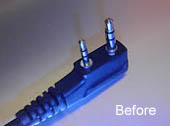 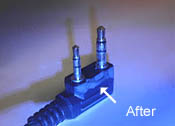
Once you get the radio to communicate with CHIRP, first thing to do is Read the radio. Safe this file as "UV5ROriginal.img" Then make a copy of the file and name it "UV5R_2-21-14.img" or whatever the date. Now go through the tabs as I showed early on in this thread checking your settings. Program your channels. NOW you can write to the radio. |
|
I'm glad I was able to save you some time and frustration. We had to learn all this from scratch as the original
factory English manual is useless. There has been a lot of reverse engineering going on to discover how these little radios really work, and how to manage the programming. 73 |

|
I would also like to thank Jupiter7200. Got my UV-5R today. Re-read page 1. Hooked up the programing cable. No Go. Remembered that the plug into the UV-5R might not be on (looked good though), pressed it, went click. Was able to program the UV-5R using CHIRP.
Thanks. |
|
Originally Posted By LRB-MT:
I would also like to thank Jupiter7200. Got my UV-5R today. Re-read page 1. Hooked up the programing cable. No Go. Remembered that the plug into the UV-5R might not be on (looked good though), pressed it, went click. Was able to program the UV-5R using CHIRP. Thanks. Yup. I think this is the most common problem... Glad you got everything working. I've just started using it to try to make some contacts and it's a blast! |
Molon Labe
|
I'm about to order a couple of the UV-5Rs. I like the idea of the extended battery pack for the ergonomics. You would think it would be cheaper to order the radio with the extended battery pack but from the prices I find on Amazon I can get the standard radio ($33) plus the extended battery pack ($18) for cheaper than the radio with the extended battery ($55).
But then I started thinking about the AA battery pack. I wanted to get one of these anyway for a long term prep, but is there any reason that I shouldn't run the AA pack rather than the extended battery? I'm just wondering about how well they are built, or if there any other issues with them. I'm aware of the voltage issue, I would be running Eneloops in them. |
|
Originally Posted By dairyfarmer:
I'm about to order a couple of the UV-5Rs. I like the idea of the extended battery pack for the ergonomics. You would think it would be cheaper to order the radio with the extended battery pack but from the prices I find on Amazon I can get the standard radio ($33) plus the extended battery pack ($18) for cheaper than the radio with the extended battery ($55). But then I started thinking about the AA battery pack. I wanted to get one of these anyway for a long term prep, but is there any reason that I shouldn't run the AA pack rather than the extended battery? I'm just wondering about how well they are built, or if there any other issues with them. I'm aware of the voltage issue, I would be running Eneloops in them. I've heard that there is some conversion issue with AA batteries and what the radio requires... I don't know anything about it other than the fact that I have read that there is an issue and might be something for you to look into a little further. Maybe someone else on here will provide a more scientific explanation as to why. I like the extended battery just for the ergonomics of using the keypad. I've never had the small battery die though, and I've left it on all day - at least 24 hours. |
Molon Labe
|
Originally Posted By dairyfarmer:
But then I started thinking about the AA battery pack. I wanted to get one of these anyway for a long term prep, but is there any reason that I shouldn't run the AA pack rather than the extended battery? I'm just wondering about how well they are built, or if there any other issues with them. I'm aware of the voltage issue, I would be running Eneloops in them. If voltage is too high it will shut down the radio. The UV-5R is designed to run from its 2-cell Lithium pack, which is 3.7 volts per cell, total 7.4 volts. If you run 6 Alkalines, that's 6 cells x 1.5 v/cell = 9 volts. Too high. The solution to this is, if using Alkalines, insert one dummy cell, so that you are only using 5 cells x 1.5 volts = 7.5 volts, which won't bother the radio at all. If using NiCads, 6 x 1.3 volts (fully charged NiCads) = 7.8 volts, again, well within the voltage handling of the radio. You can make a dummy cell from a piece of 1/2" dia dowel with a metal tack in each end, connected by a piece of wire. |

| I've ran Eneloops in my AA batt pack. It worked, but it might not be good to run them hot off the charger. If you pop in fully charged Eneloops right out of the charger they can belt out 1.45 volts per cell until they've set a bit and "normalized". I keep 6 Eneloops in my Baofengs pack, but I don't worry about it at all because I keep them for backup. By the time I use them, they've already set long enough to behave normally. |
Rehypothecation. Coming to a formerly free Republic soon.
NRA/GOA/SAF/VFW Lifer
NRA/GOA/SAF/VFW Lifer
|
Originally Posted By Variable556:
I've ran Eneloops in my AA batt pack. It worked, but it might not be good to run them hot off the charger. If you pop in fully charged Eneloops right out of the charger they can belt out 1.45 volts per cell until they've set a bit and "normalized". I keep 6 Eneloops in my Baofengs pack, but I don't worry about it at all because I keep them for backup. By the time I use them, they've already set long enough to behave normally. That is good to know. I hadn't looked that close to the Eneloops yet, but figured they would be similar to the other rechargeable batteries out there. Thank you. |
|
Originally Posted By Jupiter7200:
You can make a dummy cell from a piece of 1/2" dia dowel with a metal tack in each end, connected by a piece of wire. I guess Radio Shack stopped carrying these? They're available on eBay though. http://www.ebay.com/itm/2pcs-Pack-Dummy-Battery-AA-2A-Size-Conduct-Conductor-Electric-Current-Ultracell-/380818309877 |
|
Originally Posted By wdlsguy:
I guess Radio Shack stopped carrying these? They're available on eBay though. http://www.ebay.com/itm/2pcs-Pack-Dummy-Battery-AA-2A-Size-Conduct-Conductor-Electric-Current-Ultracell-/380818309877 Originally Posted By wdlsguy:
Originally Posted By Jupiter7200:
You can make a dummy cell from a piece of 1/2" dia dowel with a metal tack in each end, connected by a piece of wire. I guess Radio Shack stopped carrying these? They're available on eBay though. http://www.ebay.com/itm/2pcs-Pack-Dummy-Battery-AA-2A-Size-Conduct-Conductor-Electric-Current-Ultracell-/380818309877 Well, smart guy! Why would you want to buy them when you can spend twice as much making them, take an hour to do so, and cut your finger with the saw?
|
|
Originally Posted By Jupiter7200:
Well, smart guy! Why would you want to buy them when you can spend twice as much making them, take an hour to do so, and cut your finger with the saw?  Thanks for the information about homebrewing these though, it's more in the spirit of Amateur radio. Thanks for the information about homebrewing these though, it's more in the spirit of Amateur radio. 
|

|
Originally Posted By Senorx:
I'm finally getting around to setting up my radio, but do not have a clue where to start. I have the following: UV-5R with a 3600 maH Li-ion battery, a Nagoya NA-701 antenna, FTDI chipped cable and the disk it came with it. What next? First step is to destroy the disk without even thinking of using it. Seriously! You will get nothing but grief out of the little round disc of Baofeng plastic. Next step: Download CHIRP. Get the daily build one. ETA: http://chirp.danplanet.com/projects/chirp/wiki/Download |
NRA/GOA/SAF/VFW Lifer
|
Originally Posted By Variable556:
First step is to destroy the disk without even thinking of using it. Seriously! You will get nothing but grief out of the little round disc of Baofeng plastic. Next step: Download CHIRP. Get the daily build one. ETA: http://chirp.danplanet.com/projects/chirp/wiki/Download Originally Posted By Variable556:
Originally Posted By Senorx:
I'm finally getting around to setting up my radio, but do not have a clue where to start. I have the following: UV-5R with a 3600 maH Li-ion battery, a Nagoya NA-701 antenna, FTDI chipped cable and the disk it came with it. What next? First step is to destroy the disk without even thinking of using it. Seriously! You will get nothing but grief out of the little round disc of Baofeng plastic. Next step: Download CHIRP. Get the daily build one. ETA: http://chirp.danplanet.com/projects/chirp/wiki/Download Here is the direct ultra secret for only guys in the know link. http://trac.chirp.danplanet.com/chirp_daily/LATEST/ Get the ones that says installer exe. |

|
What next after I download CHIRP? Total newbie here.
Originally Posted By Jupiter7200:
Here is the direct ultra secret for only guys in the know link. http://trac.chirp.danplanet.com/chirp_daily/LATEST/ Get the ones that says installer exe. Originally Posted By Jupiter7200:
Originally Posted By Variable556:
Originally Posted By Senorx:
I'm finally getting around to setting up my radio, but do not have a clue where to start. I have the following: UV-5R with a 3600 maH Li-ion battery, a Nagoya NA-701 antenna, FTDI chipped cable and the disk it came with it. What next? First step is to destroy the disk without even thinking of using it. Seriously! You will get nothing but grief out of the little round disc of Baofeng plastic. Next step: Download CHIRP. Get the daily build one. ETA: http://chirp.danplanet.com/projects/chirp/wiki/Download Here is the direct ultra secret for only guys in the know link. http://trac.chirp.danplanet.com/chirp_daily/LATEST/ Get the ones that says installer exe. |
"There is no hunting like the hunting of man, and those who have hunted armed men long enough and liked it, never care for anything else thereafter." -Ernest Hemmingway

| Go on youtube and watch the videos walking you through setting up and using CHIRP. They are very helpful. |
I'd rather die on my feet then live on my knees.
I came into this world kicking, screaming, and covered in somebody else's blood, and i have no problem going out that way.
I came into this world kicking, screaming, and covered in somebody else's blood, and i have no problem going out that way.
|
I bought one, downloaded CHIRP, grabbed a list of repeaters through CHIRP, uploaded them to the radio which was promptly bricked.
Since the keypad is unresponsive as is every button but the flashlight one I can't reset it. I removed the battery severl times and no luck. Pretty frustrating start here 
|
|
Originally Posted By MarcGee:
I bought one, downloaded CHIRP, grabbed a list of repeaters through CHIRP, uploaded them to the radio which was promptly bricked. Since the keypad is unresponsive as is every button but the flashlight one I can't reset it. I removed the battery severl times and no luck. Pretty frustrating start here I hope you bought it locally rather than from China because if so you can just return it...... |