


Armory Sponsor

Posted: 7/2/2014 5:28:01 PM EDT
| Hello, so i have a form 1 that i submitted March 19. When i went on my ATFonline home page i saw there was a file in "DRAFT" as well as "Signed/SUBMITTED". As i was going through i saw the "draft" was what i thought was a form that somehow posted as a duplicate, so when i deleted it my Signed/ Submitted form disappeared as well! Am i screwed? |
|
I think they can still see them. It's been a well documented issue here that if you delete the DRAFT copy, both disappear. I have 4 approved, and each still has a DRAFT copy sitting in EForms (you get a duplicate if you go back and add an attachment after submission).
Definitely call or use Ask The Experts to verify they can still see their copy. |
|
I only have one under Signed/Submitted, no Draft. I filled it out and submitted it without logging out, in one session.
This is my first eform 1 SBR'ing a lower: I'm building a 300 blackout using an old Colt Sporter Match HBAR lower. I followed the sticky. Adding firearm, I found COLT under mfr, then SPORTERMATCHHBAR under model. So far so good. I certainly did not see any other choices except 223 under the Caliber pull-down menu, so I had to tic the custom box and enter 300/caliber as recommended. I guess this means I am in "pending research" status, as that's what the email I got after I submitted read. I take it this is normal when making a blackout from a .223? How long does the "research" take, usually? |
|
Quoted:
I certainly did not see any other choices except 223 under the Caliber pull-down menu, so I had to tic the custom box and enter 300/caliber as recommended. I guess this means I am in "pending research" status, as that's what the email I got after I submitted read. I take it this is normal when making a blackout from a .223? How long does the "research" take, usually? It happens when the model you input and the caliber you want aren't a combination they have in the records. I went through it twice, and it was fixed within 24-48 hours both times. You could've helped yourself out by attaching a .doc file with a couple sentences to explain why you had to input your own data. I did that once, and with the other I attached a pic as the model number wasn't in he dropdown. Either way, they should get to it pretty soon. Shouldn't be an issue since you used what you were actually making. |
|
Quoted:
Oh, was that in the sticky? I missed it. Doesn't look like you can add a file after its been submitted. Had I known, I would have done that. You can add one. I've done it four times now. ETA: Here is the thread where I described my experience in doing so... |
|
You can use the "link to this post" feature instead of the "read pg 7 half way down" method... 
|
|
Didn't work for me. Got error pop up about missing mime or some shit when adding file. Tried a couple times. Gave up.
Might be more helpful to add this info about adding a note for caliber change to the first post in the sticky, where it explains attaching your trust doc. I didn't read page 7. TL;DR ya know. I'll let this ride and see what happens. Thanks anyway. |
|
Quoted:
Didn't work for me. Got error pop up about missing mime or some shit when adding file. Tried a couple times. Gave up. Might be more helpful to add this info about adding a note for caliber change to the first post in the sticky, where it explains attaching your trust doc. I didn't read page 7. TL;DR ya know. I'll let this ride and see what happens. Thanks anyway. You mean like this note from the OP? 
And then again here... 
|
|
Not bitching BW, but your explanation involved the model number not being on the list so you added a picture. I have my own notes now, so carry on. Thanks for the basics.
Note: I was able to add a Word .docx explaining the cal change to 300 from 223. I guess it doesn't like .txt files. After adding the file, I clicked save. Save succeeded. I then went back to the home page, and my Submitted form showed the new doc, but I still do not have a draft, just the one orig form. So this isn't an exact science. What a shitty website. I have fired many programmers for less shitty work. Sorry for the hijack. We are done here. |
|
Quoted:
Not bitching BW, but your explanation involved the model number not being on the list so you added a picture. I have my own notes now, so carry on. Thanks for the basics. The example I had was for model, as that's the "issue" I had when taking the screen shots. However, both notes clearly (at least to me) mention model and caliber. You can choose not to respond if you wish, but I'd like the guide to stay as helpful as possible. If you want to reply, or just send me an IM, I'd like to know what you think I should add, and where in the flow it would've been helpful. |
|
In my case the mfr (COLT) and model (SPORTERMATCHHBAR) was on the list with only 223 as a choice of cal. It was clear that I should check the "my item is not in list" box and add the cal. Other threads on kicked back forms suggested I should only enter "300" and choose "caliber", or the form might get rejected, so I did. So I'm thinking a small box "attn: 300 blackout builders" noting explicitly how to enter caliber and to add a .doc explaining the cal cange would have helped me.
Your call. I have no idea where I am on this form now. I got an email stating I was in "PENDING RESEARCH" status right after I paid and submitted, and nothing since for 3 days. So who knows? |
|
OK...here what I put just below the screenshot where the "item description is not in the list, create new item" checkbox exists.
ETA 7/3/14: the question gets asked quite often about which caliber to use, as far as format goes. Here's a snippet from an EForms bulletin that may help:
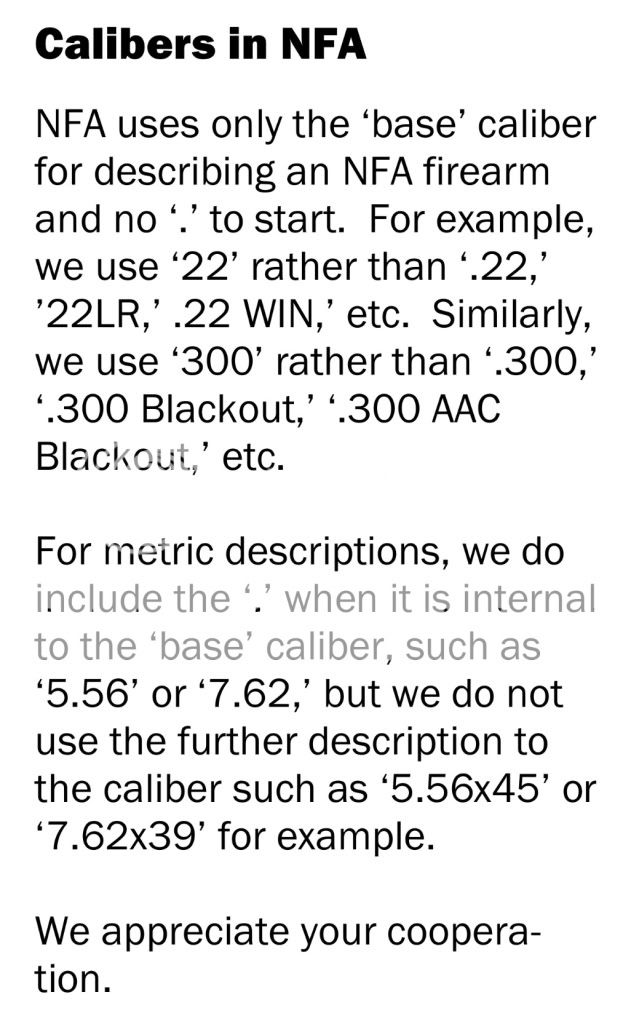
In addition, I want to add another note/tip/suggestion here that is mentioned in a couple of the screenshots. If you put the checkmark and enter your own information, it is helpful to add an attachment at the end of the process (when you upload your trust/corp) to explain why. Removing any confusion for the examiners will do nothing but help to speed up the process. So, if you choose a manufacturer, but then your model number isn't in the dropdown, attach a pic showing the SN and Model. If you choose a manufacturer and then a model, but your caliber doesn't show up, attach a .doc explaining that you're building the firearm with an upper chambered in ### (whatever caliber you input). That sound like it would've helped? |
|
Yes! I already got an email that my status changed to SUBMITTED/IN PROCESS. That was fast. Attaching the doc file did the trick, and fast. Thanks. Here is the content of the file:
To whom it may concern: I am changing the caliber of this rifle to 300 Blackout from the original 223 caliber. Name city, state phone number |
Armory Sponsor

 Win a FREE Membership!
Sign up for the ARFCOM weekly newsletter and be entered to win a free ARFCOM membership. One new winner* is announced every week!
You will receive an email every Friday morning featuring the latest chatter from the hottest topics, breaking news surrounding legislation, as well as exclusive deals only available to ARFCOM email subscribers.