


Posted: 11/12/2014 9:40:47 PM EDT
|
Anyone running 5.0 yet? I just flashed my Nexus 5 and I must say...I like it! I really like the new Google Calendar update along with the new multitasking layout. I also really dig the new notification screens and showing notifications on your lock screen. That was a huge improvement over 4.4.4
|
 Or the new Moto X. Just can't justify spending the money....salad days and all
|
Who knows when the hell my Moto Maxx HD (XT1080) will get the update... Fuckin Verizon sucks. The update to 4.4.4 (23.3.24) SUCKS! It has killed my wifi, battery, contacts settings... terrible. My Maxx was a great phone til VZW put this shit out... They may get to eat this one. |

Just flashed it on my moms 2012 Nexus 7. I don't have an Android right now but I wanted to try it out so I convinced her to let me do it on hers. 
waiting for it to boot right now.... ETA: Maybe it's just the clean install but it feels faster on the tablet. Pretty good for an old device. |
|
Quoted: Nice, is it the newer gen or first gen? I've got a first gen up and running waiting on the OTA. Quoted: Quoted: well one of my nexus 7's got the update tonight, now waiting on the other one. |
|
Quoted: In true Arfcom fashion, I have both. The 2013 got the update, still waiting for the first gen to get it. Quoted: Quoted: Quoted: well one of my nexus 7's got the update tonight, now waiting on the other one. |
|
Quoted:
You won't get it until your carrier fills it with bloatware and decides you can have it. Or you can root your phone, install custom recovery, and flash it at will. Quoted:
Quoted:
Nothing on my g2 yet You won't get it until your carrier fills it with bloatware and decides you can have it. Or you can root your phone, install custom recovery, and flash it at will. Did ask that with previous phones. Nothing spectacular do not to queued abit it any more |
|
Quoted:
Each tab is its own app in the multitask drawer. Takes some getting used to. Quoted:
Quoted:
Where dafuq did tabs go in Chrome?  This kills the deal for me. nexus 7 gen 1. Is there a work around? |
|
Quoted:
You won't get it until your carrier fills it with bloatware and decides you can have it. Or you can root your phone, install custom recovery, and flash it at will. Backup your data first if you're going to sideload. Unlike an OTA update you will lose everything. |
|
Quoted:
The OTA popped up on my Nexus5 but I don't want to upgrade just yet (heard you lose silent mode WTF?), it will not clear out the notification either! Quoted:
The OTA popped up on my Nexus5 but I don't want to upgrade just yet (heard you lose silent mode WTF?), it will not clear out the notification either! My mothers Nexus 5 still has silent mode. Quoted:
Quoted:
You won't get it until your carrier fills it with bloatware and decides you can have it. Or you can root your phone, install custom recovery, and flash it at will. Backup your data first if you're going to sideload. Unlike an OTA update you will lose everything. Weird - I sideloaded an OTA downloaded from Google and didn't lose anything when I had an N5. Didn't feel like waiting for the update
|
|
Quoted:
My mothers Nexus 5 still has silent mode. Quoted:
Quoted:
The OTA popped up on my Nexus5 but I don't want to upgrade just yet (heard you lose silent mode WTF?), it will not clear out the notification either! My mothers Nexus 5 still has silent mode. This not the case? http://www.androidpit.com/android-5-0-lollipop-silent-mode If you try to put your Android 5.0 phone into silent mode by turning down the volume, you will find something strange happens. The lowest level you can set the volume to is 1. Hit the volume down button one more time and your phone will switch to vibrate mode – there is no option to have the volume set to 0 and disable vibration. Well, there is, but it's not ideal. or these: http://www.androidpit.com/android-5-0-lollipop-problems-and-solutions there's no options other than Power Off when you long press the Power button, and the status bar ticker – that little scrolling preview of notifications – has been killed with fire in the latest version of Android Here is a mention of the Chrome thing: Chrome Browser on Lollipop is set by default to store new tabs in the recent apps list, but for many this represents one of the biggest Lollipop fails of all. Fortunately, all you need to do is head to your Chrome settings and disable ''merge tabs and apps'' to return to the more familiar ''number in a box in the URL bar'' that brings up your tab list as it always has. |
|
Quoted: Awaiting the image for my HTC One M7 GPe. Quoted: Quoted: I'm running it on my Google Nexus 7 (2012). Looks pretty cool. Awaiting the image for my HTC One M7 GPe. |
|
Quoted:
Sideloaded 5.0 on my Nexus 5. There's definitely no silent mode. I'm still trying to figure out the new interface. It looks good so far. Lollypop has a few known bugs for devices that don't ship with it and the silent mode issue is one they're aware of I believe. |
|
Quoted: Lollypop has a few known bugs for devices that don't ship with it and the silent mode issue is one they're aware of I believe. Quoted: Quoted: Sideloaded 5.0 on my Nexus 5. There's definitely no silent mode. I'm still trying to figure out the new interface. It looks good so far. Lollypop has a few known bugs for devices that don't ship with it and the silent mode issue is one they're aware of I believe. 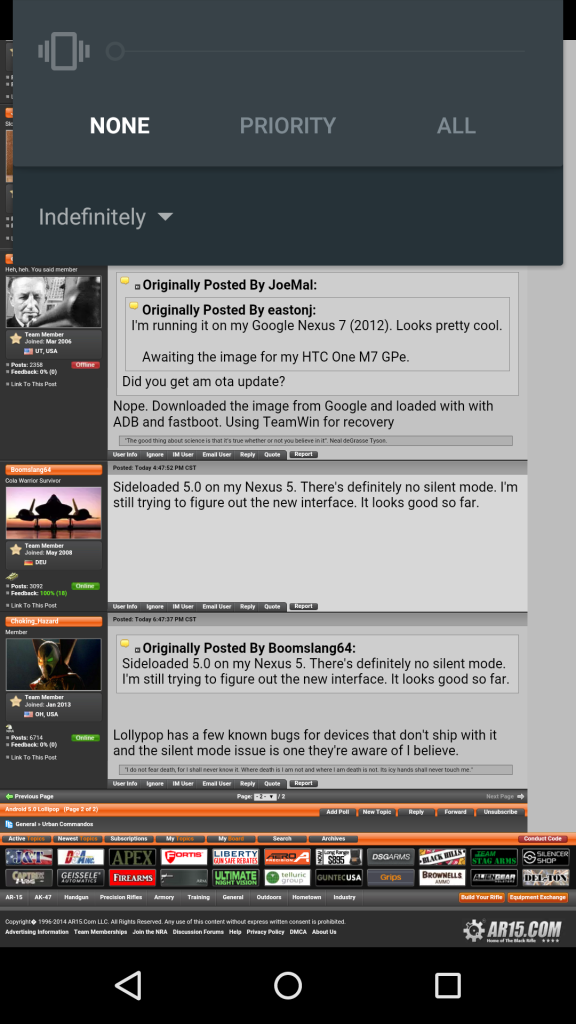 |
|
Quoted:
Not sure why everyone thinks silent mode doesn't exist unless I'm confusing it with something else. Turn volume down and press none; that will completely silent your phone until you turn up the volume http://i161.photobucket.com/albums/t232/jomal206/Screenshot_2014-11-22-19-18-54_zpsx2sqcfe0.png Quoted:
Quoted:
Quoted:
Sideloaded 5.0 on my Nexus 5. There's definitely no silent mode. I'm still trying to figure out the new interface. It looks good so far. Lollypop has a few known bugs for devices that don't ship with it and the silent mode issue is one they're aware of I believe. http://i161.photobucket.com/albums/t232/jomal206/Screenshot_2014-11-22-19-18-54_zpsx2sqcfe0.png Why should I have to even touch the screen? The volume rocker should do it. If I have to touch the screen there should be a mute widget on the main drop down. |
|
Quoted: Why should I have to even touch the screen? The volume rocker should do it. If I have to touch the screen there should be a mute widget on the main drop down. Quoted: Quoted: Quoted: Quoted: Sideloaded 5.0 on my Nexus 5. There's definitely no silent mode. I'm still trying to figure out the new interface. It looks good so far. Lollypop has a few known bugs for devices that don't ship with it and the silent mode issue is one they're aware of I believe. http://i161.photobucket.com/albums/t232/jomal206/Screenshot_2014-11-22-19-18-54_zpsx2sqcfe0.png Why should I have to even touch the screen? The volume rocker should do it. If I have to touch the screen there should be a mute widget on the main drop down.  |
|
Quoted:
I want to on my OnePlus but I'll probably just wait for CM to release their official update. They quoted less than 3 months from release - so I can deal with that. That. Love my OPO. The CM version of Lollipop will likely be fucking cool. I did pick up a Nexus 9 when it came out, to replace my second gen N7. I like the aspect ratio and size of the display better.. and I never watch movies on it so the 16:9 aspect ratio of the N7 never really did anything for me. It was annoying to browse with a long, narrow browser. The N9 is perfect for me. L on it seems pretty nice. It was a little laggy when switching apps and such, but they rolled out an update a few days ago that greatly improves that behavior. Battery life may not be as good as the N7, but you're driving a bigger screen. I think L with all the CM goodies thrown in will be great. |
|
Quoted: Not sure why everyone thinks silent mode doesn't exist unless I'm confusing it with something else. Turn volume down and press none; that will completely silent your phone until you turn up the volume Quoted: Quoted: Quoted: Sideloaded 5.0 on my Nexus 5. There's definitely no silent mode. I'm still trying to figure out the new interface. It looks good so far. Lollypop has a few known bugs for devices that don't ship with it and the silent mode issue is one they're aware of I believe. |
|
Quoted:
You won't get it until your carrier fills it with bloatware and decides you can have it. Or you can root your phone, install custom recovery, and flash it at will. Quoted:
Quoted:
Nothing on my g2 yet You won't get it until your carrier fills it with bloatware and decides you can have it. Or you can root your phone, install custom recovery, and flash it at will. Why droid will never win.... The developer tools are terrible compared to iOS and WinPhone too doesnt help... |
|
I have yet to receive the OTA update for my Nexus 7 2013.
I'm not really sure how that Priority thing works overall. It seems like sometimes (at night, or when I sit it on the charger) it goes into Priority mode. The star shows up for no reason that I can tell. I don't know if there's somewhere that I can see all existing priority apps and schedules or what. Kind of made me nervous to keep using my phone as my alarm clock, but no issues so far. |
|
I got the ota upgrade on my bone stock 2012 N7 and it absolutely bricked it.
I now have probably 5% functionality out if it, complete with a keyboard that takes ten seconds to load, random reboots, and clunky slow graphics. I tried turning off Google Now per some of the other bug reports and it helped a little, but the N7 is essentially unusable. Not a happy camper... |
|
Quoted:
Who knows when the hell my Moto Maxx HD (XT1080) will get the update... Fuckin Verizon sucks. The update to 4.4.4 (23.3.24) SUCKS! It has killed my wifi, battery, contacts settings... terrible. My Maxx was a great phone til VZW put this shit out... They may get to eat this one. the above.... all of a sudden I go to 5-8 hours of battery life.... it's horrible hope they get an update out soon that fixes it |
|
Quoted: I got the ota upgrade on my bone stock 2012 N7 and it absolutely bricked it. I now have probably 5% functionality out if it, complete with a keyboard that takes ten seconds to load, random reboots, and clunky slow graphics. I tried turning off Google Now per some of the other bug reports and it helped a little, but the N7 is essentially unusable. Not a happy camper... |
|
Quoted:
I got the ota upgrade on my bone stock 2012 N7 and it absolutely bricked it. I now have probably 5% functionality out if it, complete with a keyboard that takes ten seconds to load, random reboots, and clunky slow graphics. I tried turning off Google Now per some of the other bug reports and it helped a little, but the N7 is essentially unusable. Not a happy camper... How is it after a data wipe? |
|
Quoted:
Maybe I shouldn't upgrade mine then...I've been waiting on the OTA to come across Quoted:
Quoted:
I got the ota upgrade on my bone stock 2012 N7 and it absolutely bricked it. I now have probably 5% functionality out if it, complete with a keyboard that takes ten seconds to load, random reboots, and clunky slow graphics. I tried turning off Google Now per some of the other bug reports and it helped a little, but the N7 is essentially unusable. Not a happy camper... I would strongly recommend against it on a 2012 N7 until the bugs get worked out. Quoted:
How is it after a data wipe? Haven't tried a full wipe yet as I read that it doesn't really help but who knows. |
|
Quoted: I would strongly recommend against it on a 2012 N7 until the bugs get worked out. Haven't tried a full wipe yet as I read that it doesn't really help but who knows. Quoted: Quoted: Quoted: I got the ota upgrade on my bone stock 2012 N7 and it absolutely bricked it. I now have probably 5% functionality out if it, complete with a keyboard that takes ten seconds to load, random reboots, and clunky slow graphics. I tried turning off Google Now per some of the other bug reports and it helped a little, but the N7 is essentially unusable. Not a happy camper... I would strongly recommend against it on a 2012 N7 until the bugs get worked out. Quoted: How is it after a data wipe? Haven't tried a full wipe yet as I read that it doesn't really help but who knows. |