


[ARCHIVED THREAD] - Anyone Know SQL? (Page 1 of 2)
Posted: 11/29/2016 11:57:55 PM EDT
I am struggling with some homework and could use some help please.
|

|
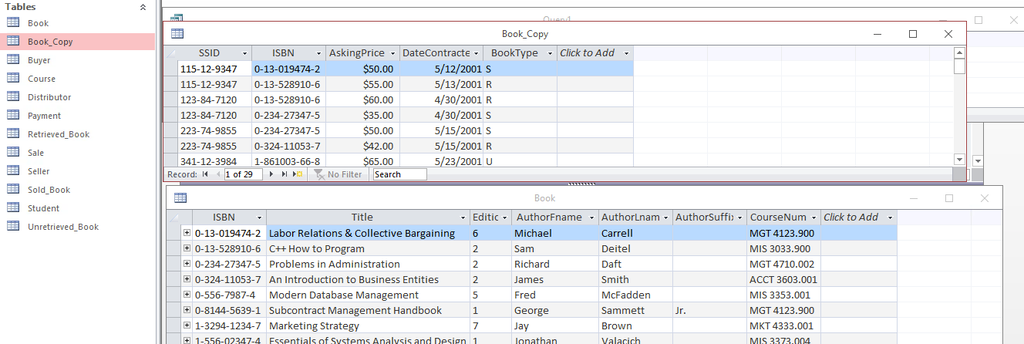
Quoted: This isn't my major just a required IS database class so we are learning using Microsoft Access. I have to do a parameter query where I Report the least expensive copy of a book whose title is entered. I have a table for book and one for book_copy I believe I need to do a join for them and then do the parameter query. http://i1201.photobucket.com/albums/bb358/sabroso1/Screen%20Shot%202016-11-29%20at%2011.11.45%20PM_zpskz1ls6zw.png This is what I have so far Select* from Book where Title = [Enter book title]; Well, for starters, you don't have to select *. You only need the title and the asking price, right? |
|
Quoted: Well, for starters, you don't have to select *. You only need the title and the asking price, right? Quoted: Quoted: This isn't my major just a required IS database class so we are learning using Microsoft Access. I have to do a parameter query where I Report the least expensive copy of a book whose title is entered. I have a table for book and one for book_copy I believe I need to do a join for them and then do the parameter query. http://i1201.photobucket.com/albums/bb358/sabroso1/Screen%20Shot%202016-11-29%20at%2011.11.45%20PM_zpskz1ls6zw.png This is what I have so far Select* from Book where Title = [Enter book title]; Well, for starters, you don't have to select *. You only need the title and the asking price, right? |
|
Quoted:
This isn't my major just a required IS database class so we are learning using Microsoft Access. I have to do a parameter query where I Report the least expensive copy of a book whose title is entered. I have a table for book and one for book_copy I believe I need to do a join for them and then do the parameter query. <a href="http://s1201.photobucket.com/user/sabroso1/media/Screen%20Shot%202016-11-29%20at%2011.11.45%20PM_zpskz1ls6zw.png.html" target="_blank">http://i1201.photobucket.com/albums/bb358/sabroso1/Screen%20Shot%202016-11-29%20at%2011.11.45%20PM_zpskz1ls6zw.png</a> This is what I have so far Select* from Book where Title = [Enter book title]; You have a unique identifier. . . can't you just do a v-lookup and phone it in 
|
|
Quoted: Yes. I need to display the minimum price as well. So would that be a min() type of statement? Quoted: Quoted: Quoted: This isn't my major just a required IS database class so we are learning using Microsoft Access. I have to do a parameter query where I Report the least expensive copy of a book whose title is entered. I have a table for book and one for book_copy I believe I need to do a join for them and then do the parameter query. http://i1201.photobucket.com/albums/bb358/sabroso1/Screen%20Shot%202016-11-29%20at%2011.11.45%20PM_zpskz1ls6zw.png This is what I have so far Select* from Book where Title = [Enter book title]; Well, for starters, you don't have to select *. You only need the title and the asking price, right? |


|
Quoted: Yeah I got that. I keep getting an error about book.mdb not being able to be found Quoted: Quoted: Book has the title. Book_copy has the price. So you know you need to join those. TO join - you need to have a unique ID shared by each table - which in this case is ISBN. |
|
Quoted:
1. It's better to answer someone's questions than just give them the answer..... 2. I would fire you if I saw that. 3. You are wrong. Quoted:
Quoted:
select price,title from table order by price asc limit 1; 2. I would fire you if I saw that. 3. You are wrong. I wouldnt work for you with an attitude like that so we're ok. 
|
|
Quoted: Paste your join statement. Quoted: Quoted: Quoted: Book has the title. Book_copy has the price. So you know you need to join those. TO join - you need to have a unique ID shared by each table - which in this case is ISBN.  |
|
Quoted: Quoted: Quoted: Quoted: Book has the title. Book_copy has the price. So you know you need to join those. TO join - you need to have a unique ID shared by each table - which in this case is ISBN. SELECT `Book`.`Title`, `Book_Copy`.`AskingPrice` FROM `Book`, `Book_Copy` WHERE `Book`.`ISBN` = `Book_Copy`.`ISBN` AND `Book`.`Title` = 'The Title' ORDER BY `Book_Copy`.`AskingPrice` ASC LIMIT 1; |
|
Quoted:
Paste your join statement. Quoted:
Quoted:
Quoted:
Book has the title. Book_copy has the price. So you know you need to join those. TO join - you need to have a unique ID shared by each table - which in this case is ISBN. This. Also Access has a particularly fucked variant of SQL, and I have a hard time remembering what does and doesn't work in it. IIRC, joins may require some careful parenthesis to work right. There's a query builder in it that can help you get it right. |

|
Quoted:
All I know about SQL is what I learned from xkcd. http://imgs.xkcd.com/comics/exploits_of_a_mom.png that's funny as fuck |
|
Quoted:
SELECT b.Title, b.ISBN, MIN(c.AskingPrice) AskingPrice FROM Book b JOIN Book_Copy c ON b.ISBN = c.ISBN WHERE b.Title = [Enter book title] GROUP BY b.Title, b.ISBN; (eta. forgot the GROUP BY...) No need to return ISBN in the result set, and you should declare the inout item as a variable at the beginning so the query does not get edited directly. |
|
Quoted: Quoted: Quoted: Quoted: Book has the title. Book_copy has the price. So you know you need to join those. TO join - you need to have a unique ID shared by each table - which in this case is ISBN. also you are missing your join statement. For example: Select * from table1 as t1 (nolock) inner join table2 as t2 on t1.field1 = t2.field1 where etc etc You can also left join, right join and outer join. |
|
Quoted:
Quoted:
Quoted:
select price,Title from Book order by price asc limit 1; ^this http://i.imgur.com/bLutSUl.jpg ha, just looked at the screenshot. yeah you would need to generate a query relating the primary key. I would say fuck it and generate a new view linking the surrogates and then filtering the information i need. |
|
Quoted:
I think that is mySQL, I am not familar with it and work with the enterprise edition, but I think it thinks book is a database instead of a table name. For example a call outside of a database query analyzer is database.dbo.table. I think you need to call as "datebase name".book.isbn. I will let someone more familiar with mySQL chime in. also you are missing your join statement. For example: Select * from table1 as t1 (nolock) inner join table2 as t2 on t1.field1 = t2.field1 where etc etc You can also left join, right join and outer join. Quoted:
Quoted:
Quoted:
Quoted:
Quoted:
Book has the title. Book_copy has the price. So you know you need to join those. TO join - you need to have a unique ID shared by each table - which in this case is ISBN. also you are missing your join statement. For example: Select * from table1 as t1 (nolock) inner join table2 as t2 on t1.field1 = t2.field1 where etc etc You can also left join, right join and outer join. That will send OP into a coma, you know that, right?
|
|
Quoted:
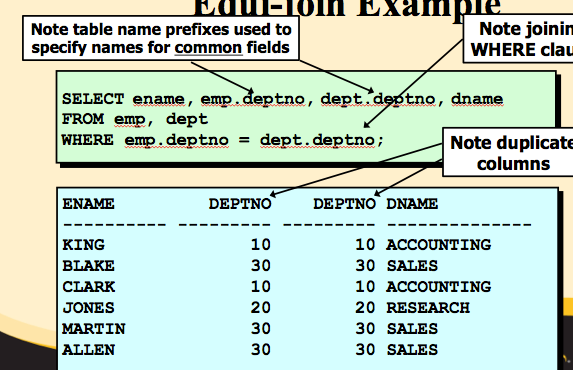
My teacher had us learning joins like this <a href="http://s1201.photobucket.com/user/sabroso1/media/Screen%20Shot%202016-11-29%20at%2011.36.57%20PM_zpsachzbztg.png.html" target="_blank">http://i1201.photobucket.com/albums/bb358/sabroso1/Screen%20Shot%202016-11-29%20at%2011.36.57%20PM_zpsachzbztg.png</a> Quoted:
Quoted:
Quoted:
SELECT b.Title, b.ISBN, MIN(c.AskingPrice) AskingPrice FROM Book b JOIN Book_Copy c ON b.ISBN = c.ISBN WHERE b.Title = [Enter book title] GROUP BY b.Title, b.ISBN; (eta. forgot the GROUP BY...) No need to return ISBN in the result set, and you should declare the inout item as a variable at the beginning so the query does not get edited directly. <a href="http://s1201.photobucket.com/user/sabroso1/media/Screen%20Shot%202016-11-29%20at%2011.36.57%20PM_zpsachzbztg.png.html" target="_blank">http://i1201.photobucket.com/albums/bb358/sabroso1/Screen%20Shot%202016-11-29%20at%2011.36.57%20PM_zpsachzbztg.png</a> That's the gay way. |
|
Quoted: No need to return ISBN in the result set, and you should declare the inout item as a variable at the beginning so the query does not get edited directly. Quoted: Quoted: SELECT b.Title, b.ISBN, MIN(c.AskingPrice) AskingPrice FROM Book b JOIN Book_Copy c ON b.ISBN = c.ISBN WHERE b.Title = [Enter book title] GROUP BY b.Title, b.ISBN; (eta. forgot the GROUP BY...) No need to return ISBN in the result set, and you should declare the inout item as a variable at the beginning so the query does not get edited directly.  . . |
|
Quoted:
<a href="http://s1201.photobucket.com/user/sabroso1/media/7047deff-c197-469c-9b52-e5f1ed0c4cc0_zpsc7ltgwhs.png.html" target="_blank">http://i1201.photobucket.com/albums/bb358/sabroso1/7047deff-c197-469c-9b52-e5f1ed0c4cc0_zpsc7ltgwhs.png</a> Quoted:
Quoted:
Quoted:
Quoted:
Book has the title. Book_copy has the price. So you know you need to join those. TO join - you need to have a unique ID shared by each table - which in this case is ISBN. try from book, book_copy |
|
Select b.isbn, c.price From book b, book_copy c Where B.title = 'UserEntered Name' And B.isbn = c.Isbn And c.Price = ( select min(price) from book_copy d where d.isbn = b.isbn) Get the isbn from book. Join it up with all of the cook_copy rows Identify the lowest cost book-copy row with a sun select use that value for the seco d joi . Done |
|
Quoted: Select b.isbn, c.price From book b, book_copy c Where B.title = 'UserEntered Name' And B.isbn = c.Isbn And c.Price = ( select min(price) from book_copy d where d.isbn = b.isbn) Get the isbn from book. Join it up with all of the cook_copy rows Identify the lowest cost book-copy row with a sun select use that value for the seco d joi . Done |
|
Quoted: I'm kinda trying to keep the syntax the same as the way she's been teaching it. We haven't learned the b.xxx c.xxx type stuff Quoted: Quoted: Select b.isbn, c.price From book b, book_copy c Where B.title = 'UserEntered Name' And B.isbn = c.Isbn And c.Price = ( select min(price) from book_copy d where d.isbn = b.isbn) Get the isbn from book. Join it up with all of the cook_copy rows Identify the lowest cost book-copy row with a sun select use that value for the seco d joi . Done |
|
Quoted:
My teacher had us learning joins like this <a href="http://s1201.photobucket.com/user/sabroso1/media/Screen%20Shot%202016-11-29%20at%2011.36.57%20PM_zpsachzbztg.png.html" target="_blank">http://i1201.photobucket.com/albums/bb358/sabroso1/Screen%20Shot%202016-11-29%20at%2011.36.57%20PM_zpsachzbztg.png</a> Quoted:
Quoted:
Quoted:
SELECT b.Title, b.ISBN, MIN(c.AskingPrice) AskingPrice FROM Book b JOIN Book_Copy c ON b.ISBN = c.ISBN WHERE b.Title = [Enter book title] GROUP BY b.Title, b.ISBN; (eta. forgot the GROUP BY...) No need to return ISBN in the result set, and you should declare the inout item as a variable at the beginning so the query does not get edited directly. <a href="http://s1201.photobucket.com/user/sabroso1/media/Screen%20Shot%202016-11-29%20at%2011.36.57%20PM_zpsachzbztg.png.html" target="_blank">http://i1201.photobucket.com/albums/bb358/sabroso1/Screen%20Shot%202016-11-29%20at%2011.36.57%20PM_zpsachzbztg.png</a> Yeah, that's awful if you're doing anything non-trivial. Or even if you aren't. But classes being what they are, suppose you'll have to do it that way for now. |
|
Quoted:
try from book, book_copy Quoted:
Quoted:
Quoted:
Quoted:
Quoted:
Book has the title. Book_copy has the price. So you know you need to join those. TO join - you need to have a unique ID shared by each table - which in this case is ISBN. try from book, book_copy But yeah, this. The FROM clause should only have tables, not fields. |
|
Quoted: Yeah, that's awful if you're doing anything non-trivial. Or even if you aren't. But classes being what they are, suppose you'll have to do it that way for now. Quoted: Quoted: Quoted: Quoted: SELECT b.Title, b.ISBN, MIN(c.AskingPrice) AskingPrice FROM Book b JOIN Book_Copy c ON b.ISBN = c.ISBN WHERE b.Title = [Enter book title] GROUP BY b.Title, b.ISBN; (eta. forgot the GROUP BY...) No need to return ISBN in the result set, and you should declare the inout item as a variable at the beginning so the query does not get edited directly. <a href="http://s1201.photobucket.com/user/sabroso1/media/Screen%20Shot%202016-11-29%20at%2011.36.57%20PM_zpsachzbztg.png.html" target="_blank">http://i1201.photobucket.com/albums/bb358/sabroso1/Screen%20Shot%202016-11-29%20at%2011.36.57%20PM_zpsachzbztg.png</a> Yeah, that's awful if you're doing anything non-trivial. Or even if you aren't. But classes being what they are, suppose you'll have to do it that way for now. |
|
Quoted: But yeah, this. The FROM clause should only have tables, not fields. Quoted: Quoted: try from book, book_copy But yeah, this. The FROM clause should only have tables, not fields. |
|
Quoted:
ha, just looked at the screenshot. yeah you would need to generate a query relating the primary key. I would say fuck it and generate a new view linking the surrogates and then filtering the information i need. Quoted:
Quoted:
Quoted:
Quoted:
select price,Title from Book order by price asc limit 1; ^this http://i.imgur.com/bLutSUl.jpg ha, just looked at the screenshot. yeah you would need to generate a query relating the primary key. I would say fuck it and generate a new view linking the surrogates and then filtering the information i need. You're a Solution Architect too? Clearly, your data is replicated and duplicated in too many places. Just insert the price into the table with the ISBN and book name and drop the other table. Then delete all the duplicate records which don't have the lowest price. |
|
Quoted: You're a Solution Architect too? Clearly, your data is replicated and duplicated in too many places. Just insert the price into the table with the ISBN and book name and drop the other table. Then delete all the duplicate records which don't have the lowest price. Quoted: Quoted: Quoted: Quoted: Quoted: select price,Title from Book order by price asc limit 1; ^this http://i.imgur.com/bLutSUl.jpg ha, just looked at the screenshot. yeah you would need to generate a query relating the primary key. I would say fuck it and generate a new view linking the surrogates and then filtering the information i need. You're a Solution Architect too? Clearly, your data is replicated and duplicated in too many places. Just insert the price into the table with the ISBN and book name and drop the other table. Then delete all the duplicate records which don't have the lowest price. |
|
Quoted:
You're a Solution Architect too? Clearly, your data is replicated and duplicated in too many places. Just insert the price into the table with the ISBN and book name and drop the other table. Then delete all the duplicate records which don't have the lowest price. Quoted:
Quoted:
Quoted:
Quoted:
Quoted:
select price,Title from Book order by price asc limit 1; ^this http://i.imgur.com/bLutSUl.jpg ha, just looked at the screenshot. yeah you would need to generate a query relating the primary key. I would say fuck it and generate a new view linking the surrogates and then filtering the information i need. You're a Solution Architect too? Clearly, your data is replicated and duplicated in too many places. Just insert the price into the table with the ISBN and book name and drop the other table. Then delete all the duplicate records which don't have the lowest price. 
Schema changes are unsupported. You must be new here? |
|
Quoted:
Schema changes are unsupported. You must be new here? Quoted:
Quoted:
Quoted:
ha, just looked at the screenshot. yeah you would need to generate a query relating the primary key. I would say fuck it and generate a new view linking the surrogates and then filtering the information i need. You're a Solution Architect too? Clearly, your data is replicated and duplicated in too many places. Just insert the price into the table with the ISBN and book name and drop the other table. Then delete all the duplicate records which don't have the lowest price.
Schema changes are unsupported. You must be new here? Yeah, you have 30 years of jankey code and "just get it working" fixes to support! |