


Posted: 8/20/2026 8:12:08 AM EDT
[Last Edit: KELBEAST][Edited]
Any FreeCad users? I’ve seen it mentioned a bunch as a capable program, and i finally got a decent computer, so I downloaded it. Anybody recommend any good youtube channels or tutorials on this thing? My background right now is Tinkercad on the iPad which is basically cave finger painting. I’d like to learn how to do the same kind of stuff but in real Cad  |

| I'm such a n00b with CAD, I could use a good primer on just modifying existing STL files. Tag for interest. |
Award: 24/365 Most likely to be an appendix.
"Dealing with Congress is like trying to have an adult conversation about the credit card with your alcoholic bi-polar Ukranian import wife."
"Dealing with Congress is like trying to have an adult conversation about the credit card with your alcoholic bi-polar Ukranian import wife."
|
I started with Freecad out of necessity 6 years ago to make things for my gig. Currently running 1.0. Looks like you have the latest version, which supposedly has more changes/improvements. At some point I will try it as a standalone, Im afraid my pc needs to upgraded, again, to handle it though. There are few youtube channels out there to get you going, but not many you will understand. Mangojelly (I think) is pretty clear. To do basic stuff like your screen shot.. new file create body create sketch (and pick plane) pad your sketch. pick a surface you want to alter/create another sketch/ pad or make a pocket (hole) Of course I am oversimplifying, but that is the jist of it. start creating. Another feature I like (I doubt its unique to Freecad), is to import an image, scale it, and trace it. This comes in handy for unique shapes, like the end of a buttsock. I just made a spacer for bolt .22. Not traced, but also made a cheek riser for it. Working on a bolt knob add on right now. For my small business...its a boon. Its also stoopidly handy for everything else, pews, making parts for carpet cleaner, toy St Michael sword for my grandson's baptism..etc..enjoy. |


|
fusion360 user here. youtube is polluted with how to video's on using it. I watched his video's and learned a lot of basic skills. https://www.youtube.com/@cadcamstuff he works for autodesk. |
To say that you are on thin ice would be a vastly optimistic view of your current situation. The ice has melted. You are being supported by the surface tension of water.

Easily irritated engineer of odd things
Joined:
Jul 2008
Posts:
32075
EE: 100% (5)
 MN, USA
|
Originally Posted By Steamedliver: I'm interested. My only interest in CAD is to 3D print. I'm going to try Blender but I've had a couple of FreeCAD YouTube videos on my save list. I know Freecad was always really shit to use, but I think I heard there was a major update. BUT Fusion is free, and crazy powerfull. It is a real CAD suite. Onshape is free, also powerful. Couple caveats with privacy, but workable. Solidworks is $25/yr, again powerful and a real CAD program. I would honestly just pick one of the big 3. Fusion has the most YT tutorials (dual monitors help a ton if you can set that up). |
Once you realize that all power comes from the credible threat of the use of deadly force, and the gov't hates you, most things become easy to understand..
|
Originally Posted By Rat_Patrol: Blender is for organic shapes; sculptures. I know Freecad was always really shit to use, but I think I heard there was a major update. BUT Fusion is free, and crazy powerfull. It is a real CAD suite. Onshape is free, also powerful. Couple caveats with privacy, but workable. Solidworks is $25/yr, again powerful and a real CAD program. I would honestly just pick one of the big 3. Fusion has the most YT tutorials (dual monitors help a ton if you can set that up). Ironically I forgot I had paid for a mil/vet license of Solidworks last year. The download expires in 1 week. But it’s good for a year after activation. So I’m doing that now. Any good tutorials for solid works? 
|

|
Originally Posted By KELBEAST: Ironically I forgot I had paid for a mil/vet license of Solidworks last year. The download expires in 1 week. But it’s good for a year after activation. So I’m doing that now. Any good tutorials for solid works? The vet edition of solidworks can't be beat. I just renewed mine yesterday. There are tutorials built in and also online. Once you know the basics of how to model then just start making stuff, and whenever you get stuck just Google how to do the thing you're stuck on. |

|
Originally Posted By Blob: The vet edition of solidworks can't be beat. I just renewed mine yesterday. There are tutorials built in and also online. Once you know the basics of how to model then just start making stuff, and whenever you get stuck just Google how to do the thing you're stuck on. They also give the same price to ALL people after the first year, so if not a vet only the first year is more expensive, and even then it is only $50, and even then they run sales. Just for others reading. |
|
Originally Posted By -Obsessed-: They also give the same price to ALL people after the first year, so if not a vet only the first year is more expensive, and even then it is only $50, and even then they run sales. Just for others reading. But you have to deal with 3DE. The vet edition is not that.  It is full Solidworks Premium (student edition) which includes all the add-ins like CAM, rendering and simulation. ETA: It also contains codes to take the CSWA and CSWP certification exams. |
|
Originally Posted By Blob: But you have to deal with 3DE. The vet edition is not that. It is full Solidworks Premium (student edition) which includes all the add-ins like CAM, rendering and simulation. Ohhhh, damn. Yeah, thats way better. 3DE is arguably the worst piece of software ever devised by man. Honestly thats 3/4 the reason I learned OnShaoe. Stupid required 3DE updates that would take an hour when Im trying to do a quick tweak. My last SW perpetual license is 2006. I doubt it even installs and Im not trying, given how aggressively they persue damages. |
I did a thiiiiiiing! Gonna need some more Ram and a GPU since I was getting system resource critical alets just rotating the view on this simple assembly. Also gonna do all the practice videos on the playlist 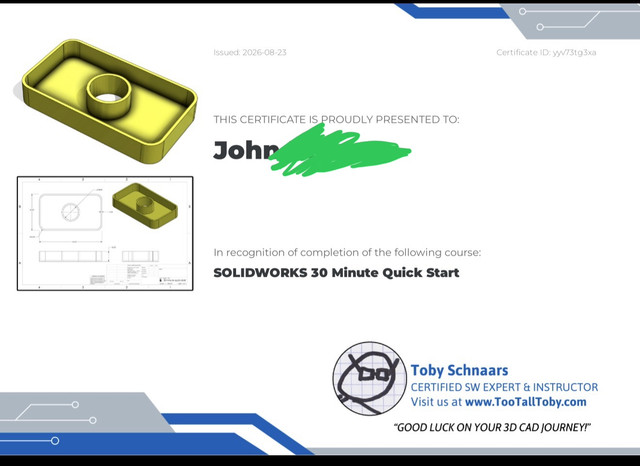 thumbnail image embed code |
|
Originally Posted By KELBEAST: I did a thiiiiiiing! Gonna need some more Ram and a GPU since I was getting system resource critical alets just rotating the view on this simple assembly. Also gonna do all the practice videos on the playlist https://i.ibb.co/1tqmS2Nw/IMG-6362.jpg thumbnail image embed code Yeah, SW is a hog. I have a 12th Gen i7 and 32GB RAM and I get constant notifications that my PC needs upgraded. It runs like shit. |

| Ever since Claude AI and Fusion started working together I have become extremely lazy. I can almost describe what I want and it will create it in Fusion. There was something I needed to look at or do the other day that I couldn't get Fusion to do and I used FreeCad to do what I needed to do. It is nice to have free options. One thing that bothers me is because I use Claude I have to store my files in the Fusion Library, it is easy to hit the 10 file limit and I have to go thru and make the files read only. Easier enough to change them back to edit something. I can export the file to a folder I share with Claude and it can open them from there but if it tries to save them they go into the library. |
Tennessee Squire