


Posted: 8/27/2014 11:56:31 AM EDT
|
Hey y'all I'm a Sophmore in college going for a Mechanical engineering degree. Anyway I'm in need of a new computer to run auto cad and hopefully last me through school. I don't want to spend much over 1,000 but I understand buy once cry once and I'm willing to spend more money to get a quality computer that won't need replacing for a while. I really would rather have a laptop and I don't really want to build my own.
Thanks for the advice y'all 
|
| Okay y'all just back from my least favorite place the electronics store. Anyway the man reccomended a ASUS 4500 U laptop they had on sale for 899. I've always had the idea that apple is best bar none but he talked like they are easily beaten stats wise for the same or less money. I could really use y'all's help here. SAVE ME GD |
| If you go the laptop route, which does have some benefit, getas much processor and RAM in excess of the AutoCAD requirements as you can fit into your budget. AND get a big external monitor. AutoCAD is (really any sort of graphic-intensive program) is easier with lots of screen real estate. |
|
Quoted:
Autocad doesn't like Mac. Sorry, not enough buttons  No one has suggested Mac... I miss my Home/End/PgUp/PgDn cluster. That's really the only thing I miss about my last machine, though. OP: If you're looking for durability and longevity, Lenovo's Thinkpad line comes highly praised. They're going to come in over your budget, but probably not terribly so. |
|
take a look at the Dell Financial Services website. They sell off-lease corporate laptops at a pretty substantial discount. Autocade and Solidworks aren't too resource intensive as long as you have a discrete graphics card and a fair amount of RAM. I currently have a Dell Precision M-something or other issued to me for work. This thing is built like a freakin tank. other engineers have bounced theirs off of hard surfaces numerous times and they've all continued working to this day. you'll typically see them with an i5 or i7 processor and an Nvidia Quaddro graphics card, none of the "intel HD" crap. i would never recommend a consumer grade dell (inspiron, XPS, etc) but their business class stuff (Latitude, Vostro, and Precision) are pretty freakin' solid. edit to add: also, with the thinkpads and business class dell's, you can get a docking station / port replicator. When i get to my desk, i drop the laptop on the dock and then it practically becomes a desktop with 2 to 4 monitors, real keyboard, mouse, etc. This is an awesome feature in my opinion. The dock adds 100-150 buck to the price, and then you're out the keyboard, mouse, monitors, etc, but it's totally worth it to have a full size keyboard, etc and real monitors when you aren't needing to be mobile. |
|
Quoted:
If you go the laptop route, which does have some benefit, getas much processor and RAM in excess of the AutoCAD requirements as you can fit into your budget. AND get a big external monitor. AutoCAD is (really any sort of graphic-intensive program) is easier with lots of screen real estate. Not an AutoCAD user, but THIS. Go with a laptop with at least 8GB of RAM, ideally 16GB! Then budget for an external monitor, think 24". |
|
I work with AutoCAD a lot and really you DO NOT want to try and run it on a laptop. You really want at least a 27" screen for doing serious and long hours of work and if you are doing it all the time I would recommend a multi screen setup.
Build or buy like you're looking for a gaming machine as a lot of the stuff you need is the same for both applications. |
|
Quoted:
Hey y'all I'm a Sophmore in college going for a Mechanical engineering degree. Anyway I'm in need of a new computer to run auto cad and hopefully last me through school. I don't want to spend much over 1,000 but I understand buy once cry once and I'm willing to spend more money to get a quality computer that won't need replacing for a while. I really would rather have a laptop and I don't really want to build my own. Thanks for the advice y'all Okay, a couple of things here from a fellow ME. - Why are you learning AutoCAD instead of Solidworks, SolidEdge, Pro-E, etc? Just curious, I've never worked anywhere AutoCAD file weren't being phased out for better software. - I hate to bust your chops here, but hopefully as a sophmore going for an engineering degree, you should be able to figure some of these things out on your own. Math is your friend and spending some time surfing NewEgg, PCworld, Tiger, etc. and learning the ins and outs of computers would greatly help you maximize your budget and understanding of what you are buying. Doing research and self-learning will go a LONG WAYS toward helping you in your career. Too many people in college right now turn to the internet for easy answers. - Give some thought to if your really need a laptop. You can build a near bleeding-edge PC for $600 or less. I built my last desktop for $500 including OS and it flat out screams. I don't even look at the minimum specs on any program. - If you have a MicroCenter nearby, stop in. Those guys can be helpful and great deals can be had. |
|
Quoted:
Serious question ....... people still use Autocad? I haven't seen it in years. Everyone I deal with seems to be doing Solid Edge, SolidWorks, or Pro E. Construction still uses it heavily as there is add on software like HydraCAD and SprinkCAD that are built on AutoCAD. |
|
Quoted:
Construction still uses it heavily. Quoted:
Quoted:
Serious question ....... people still use Autocad? I haven't seen it in years. Everyone I deal with seems to be doing Solid Edge, SolidWorks, or Pro E. Construction still uses it heavily. I was wondering this too and thought of architecture and construction, but that is Civi, not ME. |
|
Quoted:
Serious question ....... people still use Autocad? I haven't seen it in years. Everyone I deal with seems to be doing Solid Edge, SolidWorks, or Pro E. ^this - our MEs used to run either desktops or dell precision laptops with dedicated video cards to run SolidWorks and ProE. Honestly, has AutoCad advanced much faster than the average computer in the last 10 years (I think I last used R13  )? I don't think you'll need a lot of horsepower to run AutoCad, but you absolutely will if you start running the advanced applications that do surfacing, draft, etc. )? I don't think you'll need a lot of horsepower to run AutoCad, but you absolutely will if you start running the advanced applications that do surfacing, draft, etc.
|
|
Quoted:
I was wondering this too and thought of architecture and construction, but that is Civi, not ME. Quoted:
Quoted:
Quoted:
Serious question ....... people still use Autocad? I haven't seen it in years. Everyone I deal with seems to be doing Solid Edge, SolidWorks, or Pro E. Construction still uses it heavily. I was wondering this too and thought of architecture and construction, but that is Civi, not ME. You got me why he's learning AutoCAD and going for an ME and when it seems to have been pretty much phased out in that field. |
|
Quoted:
Serious question ....... people still use Autocad? I haven't seen it in years. Everyone I deal with seems to be doing Solid Edge, SolidWorks, or Pro E. we use it, but we do a lot of .gov work (IOW, the .gov uses it) SE excels in 3D, IMHO. You can run AutoCAD on a laptop, but make sure you get one that exceeds the recommended minimum and make sure the one you select has a video card, not some cheezy on-board POS like my company provided. you don't need a lot of horsepower (CPU) to run cad, it's all in the graphics, unless you're going to render 3D models. I wish AutoDesk wouldn't try and reinvent the friggin wheel every year to justify sales if you've read this far, and are interested in CAD, might I suggest getting Draftsight...its free and they have it for mac/win/linux a good majority of the AutoCAD commands work in it, which is a plus for the old timers like me
|
|
Quoted:
Okay, a couple of things here from a fellow ME. - Why are you learning AutoCAD instead of Solidworks, SolidEdge, Pro-E, etc? Just curious, I've never worked anywhere AutoCAD file weren't being phased out for better software. - I hate to bust your chops here, but hopefully as a sophmore going for an engineering degree, you should be able to figure some of these things out on your own. Math is your friend and spending some time surfing NewEgg, PCworld, Tiger, etc. and learning the ins and outs of computers would greatly help you maximize your budget and understanding of what you are buying. Doing research and self-learning will go a LONG WAYS toward helping you in your career. Too many people in college right now turn to the internet for easy answers. - Give some thought to if your really need a laptop. You can build a near bleeding-edge PC for $600 or less. I built my last desktop for $500 including OS and it flat out screams. I don't even look at the minimum specs on any program. - If you have a MicroCenter nearby, stop in. Those guys can be helpful and great deals can be had. Quoted:
Quoted:
Hey y'all I'm a Sophmore in college going for a Mechanical engineering degree. Anyway I'm in need of a new computer to run auto cad and hopefully last me through school. I don't want to spend much over 1,000 but I understand buy once cry once and I'm willing to spend more money to get a quality computer that won't need replacing for a while. I really would rather have a laptop and I don't really want to build my own. Thanks for the advice y'all Okay, a couple of things here from a fellow ME. - Why are you learning AutoCAD instead of Solidworks, SolidEdge, Pro-E, etc? Just curious, I've never worked anywhere AutoCAD file weren't being phased out for better software. - I hate to bust your chops here, but hopefully as a sophmore going for an engineering degree, you should be able to figure some of these things out on your own. Math is your friend and spending some time surfing NewEgg, PCworld, Tiger, etc. and learning the ins and outs of computers would greatly help you maximize your budget and understanding of what you are buying. Doing research and self-learning will go a LONG WAYS toward helping you in your career. Too many people in college right now turn to the internet for easy answers. - Give some thought to if your really need a laptop. You can build a near bleeding-edge PC for $600 or less. I built my last desktop for $500 including OS and it flat out screams. I don't even look at the minimum specs on any program. - If you have a MicroCenter nearby, stop in. Those guys can be helpful and great deals can be had. Thank you for typing this so I didn't have to. OP, if you think the salesman at Best Buy is any sort of authority on anything even remotely technical, you're in for a world of hurt. Building a PC is something most technically capable 13 year olds should be able to do. I'm sure you'll be able to figure it out with the help of Newegg and YouTube. |
|
I think anything on the shelf these days will be fine for AutoCad OP.
Minimum requirements for AutoCad 2015: Windows 7 A network connection Intel Pentium 4
2GB Memory Display Resolution: 1024x768 http://knowledge.autodesk.com/support/autocad/troubleshooting/caas/sfdcarticles/sfdcarticles/System-requirements-for-AutoCAD-2015.html |
|
Quoted:
Ah, gotcha. Quoted:
Quoted:
Quoted:
Serious question ....... people still use Autocad? I haven't seen it in years. Everyone I deal with seems to be doing Solid Edge, SolidWorks, or Pro E. Construction still uses it heavily. Ah, gotcha. There are lots of add-ons from 3rd party companies geared to specific fields in construction and everyone using the same basic software platform enables 20 different sub-contractors on a large commercial project to 3D BIM models that have every part included of the project before ground is ever broken. I've been involved in two BIM projects and it seems to keep a lot of pissing contest stuff between trades, change orders, and RFIs to a minimum. |
|
Thanks again for all the help y'all. I really can't use a desktop as I need to take it back and forth to school as well as I'm living with my parents that split and will need the ability to have my computer with me no matter where I stay. But the dock idea sounds pretty cool and I'll look into that. I don't plan on using this computer in a few years professionally as it will likely be out of date I just need it to get me through school with ease and maybe get me started at a company but then again it seems like I would be issued a CPU... . However I don't want it to have to max out it's capability every time I do an assignment. I'll go by micro center Tomorrow and talk with one of their folks that supposedly know what they are talking about. As far as the Lenovo that I found at best buy... Is that a decent price point for that machine? The guy acted like it would run my auto cad or whatever else well but I'm clueless on this subject and again I don't want to be maxing it out every week for homework .
Links to good computers or some really basic stats would be really helpful. Or even a good place to gain a better understanding of what I need. |
|
I worked with 3 ME's at my old job (in HVAC) and AutoCAD is indeed still used pretty often. We were typically involved with gov new construction/renovation. OP stay far away from Best Buy, they have old models at crap prices, and their staff is normally clueless ETA: If you're hell bent on a laptop, look at one with a dedicated graphics card. You might have to adjust your price point for that alone. |
|
Really, AutoCAD doesn't require very much in terms of Horsepower to run these days. The days when it required a top-flight machine are LONG past. Discrete Graphics are a plus, but a second-generation Intel i3/5/7 is more than enough(what are we on, Gen4 now?). Just stay away from machines with old processors or Atom-based machines. Intel i-series or AMD A6 or greater should be fine. (As a plus, most of the AMD machines have discrete graphics).
NO APPLE. Wherever you work isn't going to use Apple. You'll end up buying Windows and dual-booting to run some software. And a comparably priced Windows machine will have MUCH better hardware. |
|
Quoted:
Hey y'all I'm a Sophmore in college going for a Mechanical engineering degree. Anyway I'm in need of a new computer to run auto cad and hopefully last me through school. I don't want to spend much over 1,000 but I understand buy once cry once and I'm willing to spend more money to get a quality computer that won't need replacing for a while. I really would rather have a laptop and I don't really want to build my own. Thanks for the advice y'all http://www.microcenter.com/product/427857/ProBook_450_G1_156_Laptop_Computer_-_Black |
|
Quoted:
Quoted:
Hey y'all I'm a Sophmore in college going for a Mechanical engineering degree. Anyway I'm in need of a new computer to run auto cad and hopefully last me through school. I don't want to spend much over 1,000 but I understand buy once cry once and I'm willing to spend more money to get a quality computer that won't need replacing for a while. I really would rather have a laptop and I don't really want to build my own. Thanks for the advice y'all http://www.microcenter.com/product/427857/ProBook_450_G1_156_Laptop_Computer_-_Black They have some in stock at my local store. Thanks a bunch. I'll look at it tommorow. Any other suggestions for micro center products? I can stretch to 1500$ if I absolutely have to but if the gains are only marginal I'll save the cash for something else |
|
Quoted:
Thanks again for all the help y'all. I really can't use a desktop as I need to take it back and forth to school as well as I'm living with my parents that split and will need the ability to have my computer with me no matter where I stay. But the dock idea sounds pretty cool and I'll look into that. I don't plan on using this computer in a few years professionally as it will likely be out of date I just need it to get me through school with ease and maybe get me started at a company but then again it seems like I would be issued a CPU... . However I don't want it to have to max out it's capability every time I do an assignment. I'll go by micro center Tomorrow and talk with one of their folks that supposedly know what they are talking about. As far as the Lenovo that I found at best buy... Is that a decent price point for that machine? The guy acted like it would run my auto cad or whatever else well but I'm clueless on this subject and again I don't want to be maxing it out every week for homework .
Links to good computers or some really basic stats would be really helpful. Or even a good place to gain a better understanding of what I need. If you think they'e going to issue you a CPU, you'd better make sure you get a motherboard with the correct slot type. Do you know if it's going to be Intel or AMD? ... That was sarcasm. In all seriousness, you should really learn more about computers if you're planning on sitting in front of one for a good portion of your career. This is a CPU: 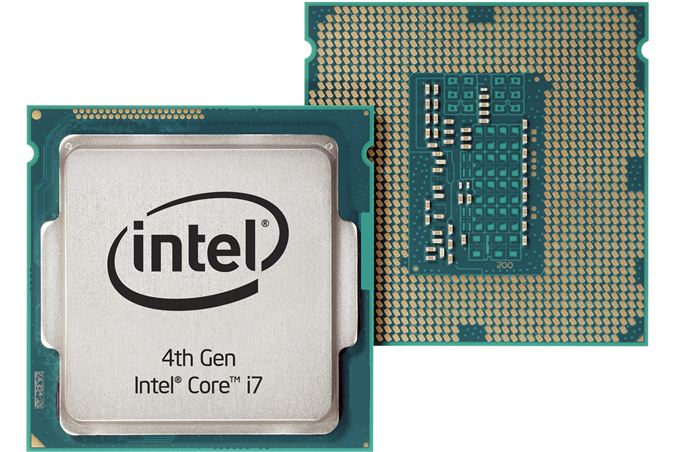
This is a desktop PC, sans peripherals: 
|
|
Quoted: I work with AutoCAD a lot and really you DO NOT want to try and run it on a laptop. You really want at least a 27" screen for doing serious and long hours of work and if you are doing it all the time I would recommend a multi screen setup. Build or buy like you're looking for a gaming machine as a lot of the stuff you need is the same for both applications. Build a solid desktop and get the biggest monitor.
|
|
Quoted:
Okay y'all just back from my least favorite place the electronics store. Anyway the man reccomended a ASUS 4500 U laptop they had on sale for 899. I've always had the idea that apple is best bar none but he talked like they are easily beaten stats wise for the same or less money. I could really use y'all's help here. SAVE ME GD I hate ASUS. Had some run-ins with their support and they're awful. Lenovo is where it's at if you need a Windows PC. It's the only off-the-shelf Windows box I'd even consider. |
|
Quoted:
I hate ASUS. Had some run-ins with their support and they're awful. Lenovo is where it's at if you need a Windows PC. It's the only off-the-shelf Windows box I'd even consider. Quoted:
Quoted:
Okay y'all just back from my least favorite place the electronics store. Anyway the man reccomended a ASUS 4500 U laptop they had on sale for 899. I've always had the idea that apple is best bar none but he talked like they are easily beaten stats wise for the same or less money. I could really use y'all's help here. SAVE ME GD I hate ASUS. Had some run-ins with their support and they're awful. Lenovo is where it's at if you need a Windows PC. It's the only off-the-shelf Windows box I'd even consider. I've had fantastic luck with Toshiba laptops. Also, dual monitors >> single large monitor That being said, you are a 2nd year ME and can't spec a computer from software requirements? Perhaps you should consider a different career path. |
|
ME student here. Lenovo and Toshiba are both good to go generally. I use a Toshiba and most other students I see using a laptop use one of those two, with a few Acers in the mix. I have had a couple ASUS in my life and they had a lot of problems. This doesn't seem unusual from what I hear.
I don't see anybody use Apple in my program at all, except maybe an iPad for notes. That should be a clue. Check woot.com for deals, they have decent Toshibas for a good price on a regular basis. I am told that industry is moving away from AutoCAD and SolidWorks/Catia, NX, and Pro/E/Creo are the big ones these days but you'll probably learn at least a couple in your program. We learned SolidWorks last semester in a visualization/computation class and are learning NX in a CAE class this semester, for example. But AutoCAD has an advantage that as a student you get AutoCAD Inventor for free, legally. |
|
Quoted:
Don't get a laptop and build your own. Seriously, if you want a cheap computer to do any serious work for three years or so, you probably should build a desktop.Quoted:
Don't get a laptop and build your own. Seriously, if you want a cheap computer to do any serious work for three years or so, you probably should build a desktop.Pretty much this. Desktops in my opinion have a bit longer lifespan than laptops. Ain't ever had a desktop die on me. Hell I still have one that's at least 13 years old here that runs like a champ. Just gotta dust it off once in a while. Quoted:
Okay y'all just back from my least favorite place the electronics store. Anyway the man reccomended a ASUS 4500 U laptop they had on sale for 899. I've always had the idea that apple is best bar none but he talked like they are easily beaten stats wise for the same or less money. I could really use y'all's help here. SAVE ME GD You know that old desktop I just mentioned? The one that still runs like a champ? Apple G4 desktop from 2002. You ever seen an Asus last 13 years? Granted, laptop lifespan's a little shorter. I managed to run my Macbook into the dirt... took about 5 years. My partner treated his better so it took about 7 years to start looking long in the tooth. Don't just consider what you need a laptop or desktop for in the next year. Consider what you need it for in the next 5-7 years (or longer if a desktop). Lenovo - don't remember much about them except that we sold some of them at my last tech job toshiba - eh, i still like apple better but at least toshiba lets you burn multiple copies of your recovery DVDs. |
|
At one time operating systems and common apps like web browsers and mail clients used to be fairly streamlined, but stuff like CAD and graphics-heavy games required serious hardware to run. Back then it wasn't uncommon to spend well into 4-figures just to build a PC that would let you turn up the resolution and animations on Far Cry. But now that Windows and most apps are just incredibly bloated pieces of shit, even the cheapest low-level PC usually has no problems running programs like 3-D CAD. Applications like AutoCAD and SolidWorks bloated out early, and now that OSes and cheap hardware have caught up there's really no need to but an expensive CAD-dedicated computer.
I'm currently running Solid Edge ST4 on this super cheapo Dell and it works just fine. Smooth motion, opens projects quickly, never crashes, etc. Seriously, I think Firefox bogs the system down more. I've got a copy of ST6 I'm going to be trying out soon, but I don't anticipate any problems. So save your money and just buy any new PC with 4 GB (or better yet 8 GB) of memory, a mid-range CPU, and a big enough HD and you'll be fine. Take the $600-$700 you saved on this and buy a new PC in a couple of years to replace it. |
|
Quoted:
At one time operating systems and common apps like web browsers and mail clients used to be fairly streamlined, but stuff like CAD and graphics-heavy games required serious hardware to run. Back then it wasn't uncommon to spend well into 4-figures just to build a PC that would let you turn up the resolution and animations on Far Cry. But now that Windows and most apps are just incredibly bloated pieces of shit, even the cheapest low-level PC usually has no problems running programs like 3-D CAD. Applications like AutoCAD and SolidWorks bloated out early, and now that OSes and cheap hardware have caught up there's really no need to but an expensive CAD-dedicated computer. I'm currently running Solid Edge ST4 on this super cheapo Dell and it works just fine. Smooth motion, opens projects quickly, never crashes, etc. Seriously, I think Firefox bogs the system down more. I've got a copy of ST6 I'm going to be trying out soon, but I don't anticipate any problems. So save your money and just buy any new PC with 4 GB (or better yet 8 GB) of memory, a mid-range CPU, and a big enough HD and you'll be fine. Take the $600-$700 you saved on this and buy a new PC in a couple of years to replace it. That is entirely dependent on how complex the file is. I have had a couple that choked up my machine that has 24 GB RAM, a Sapphire Vapor X video card, and a an intel I5 processor that's been overclocked to 3.2 GHz. |