


Posted: 7/9/2016 2:00:04 PM EDT
|
I'm going from DSL to cable internet. For a long time, DSL and satellite were the only internet options in my area. Time Warner has finally ran lines, so I can now get internet faster than the 6 Mbps DSL I have right now. I am keeping directv.
After the coaxial cable comes into a modem (which I plan on having in the box in the garage wall), where do I plug the wire coming out of the modem? Should I only hook it to one since I only need it in my living room where I will have my wireless router....or should I just send it to all the rooms? I don't use any landline phones. 
|
|
Since that is something I obviously know nothing about, is it something I should do myself or would the install guy do it?
So, just find the cable that runs to the living room, unplug it from the telephone hub, cut the end and replace the end with a male Ethernet end, then put on a Ethernet end other end of the cable in the living room where the wireless router will plug into... Then once I get the modem in, plug the living room cable in the garage into it. |
|
DSL comes in the house on a phone type wire cable (cat 5).
The cable model signal is going to come in the house on the coax cable that is used for cable TV instead. So if you have a coax jack in the room that has the DSL modem now, your golden. 
Out of the cable modem will be the same as you where coming out of the DSL modem now ( to swtich or wifi router with switch from out of the modem, and this is where the internet cables to the other rooms connect). As for if the other rooms are not wired, then it can get spendy running wires from the switch to the other rooms, and would be easy to just run a wifi router isntead. So you run this, 
Instead of this, 
|
|
So if you have a coax jack in the room that has the DSL modem now, your golden. I do...but it is hooked up to the directv receiver. I could have them run another coax to the same place though....or put the wireless router in one of the kids rooms since they do not have a tv. |
|
Quoted:
I do...but it is hooked up to the directv receiver. I could have them run another coax to the same place though....or put the wireless router in one of the kids rooms since they do not have a tv. Quoted:
So if you have a coax jack in the room that has the DSL modem now, your golden. I do...but it is hooked up to the directv receiver. I could have them run another coax to the same place though....or put the wireless router in one of the kids rooms since they do not have a tv. Not a problem, since you (if you buy your own cable modem)/they (if you are renting a cable modem) will slip the cable out of the wall, and one will run to the modem, and the other to the directv receiver. Hence both signals are coming in on the same coax to the house.
So any room that these coax cables are going, you can add the cable modem without having to add a coax cable to that room.
|
|
Before you buy a wifi router, figure out what device are going to be connecting to it, and if you have a slow device, is it going to kick the router down to that speed for all the devices that are going to be connecting to it at the same time.
As for getting one with a USB port for NAS, not always the best way to go, and something like a Banna Pro on one of the RJ-45 ports ends up being cheaper and faster instead for a simple NAS instead. |
|
I'm assuming there is only one incoming coax feed from the outside, and DirectTV is using it?
Have TWC run a new coax line from their outside box, to your inside smart panel. Stuff the cable modem in the panel, and then plug in the ethernet line going to your router location. Check to make sure all four pairs of wire are punched down correctly in the phone/ethernet jack near the router. I would only plug the one blue cat5 going to the wireless router into the modem. The blue line will go into the yellow port on the back of the modem. |
|
My take, dump the direct TV (money pit), just have the basic internet service, and run Kodi from the basic internet to drive the TV's for free isntead.
Hence with XBMC/Kodi, there is nothing that you can't watch for free instead (1 Channel, Navi-X, Exodus, and Phoenix will cover just about everything you want to watch) . |
|
Quoted:
I'm assuming there is only one incoming coax feed from the outside, and DirectTV is using it? Have TWC run a new coax line from their outside box, to your inside smart panel. Stuff the cable modem in the panel, and then plug in the ethernet line going to your router location. Check to make sure all four pairs of wire are punched down correctly in the phone/ethernet jack near the router. I would only plug the one blue cat5 going to the wireless router into the modem. The blue line will go into the yellow port on the back of the modem. Yes, there is only 1 coax. So I'm going to plan to have the modem in the garage box with the new coax run. For the cat 5 wire that is currently running to my living room from the telephone panel, I will need to wire up RJ45 ends, correct? Dano, in the future, I am planning on likely switching away from cable. |
|
Lets back it up a bit, and figure out what you have coming into the house now cable wise.
Since you have direct TV, then you have the co-ax from the dish to the house at your , and since looks like you have hard line at the house as well, then should be a phone box on the outside of the house as well. At the phone box on the outside of your house, see if there is just a couple of standard 6 pair cables coming into the house, or if there is a Co-ax cable coming in the house from it as well. If the only co-ax cable you have coming in the house is just the cable for the TV satellite, then the cable company will need to bring in the cable co-ax to the house from their distribution point for the neighborhood. The will at least land the co-ax to a box on the house (most of the time is the Phone line box, or in a box next to the phone line box on the out side of the house, or if want or need, then they can run from the cable/phone box on the side of the house with co-ax, to a point in your house that you want the modem to be installed (for a extra fee). Once you have modem installed, then going to run a cat 5 internet patch cable with rj-45 connectors from the modem to the wifi router. From there, you need to hook up at least one internet cable from your main computer to the WiFi route, since the wifi router will require a hard line into it to get into the program settings. The rest of the device in the house can be run through the wifi side of the routher, or if you want to hard line some other devices (like I do with my Privo box for the TV), then you will run another Cat 5 out out of the wifi router to that/those devices isntead. So to make up your patch cables with RJ-45's, 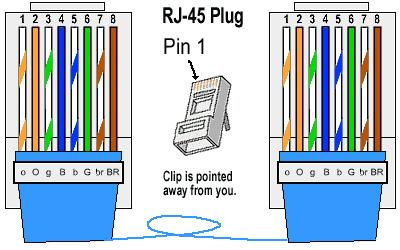
As for cable, be it cat 5, cat 5e , cat 6, or cat 6a, it all up to you and what future plans you have for needed cable speeds. 
Hence cable modems only average around 35mbps, so they many not be the fastest link in the system (choke point most of the time instead). If you are hard cabling two devices through a switch, then let that switch speed dictate which cable you should run instead. So if you are going to run a 10gbps switch, then need at least cat6, and if the cable run is going to be more than 100 feet, it needs to be cat6a instead. For most homes with less than 100ft runs per patch cable, Cat 5e is about all that is needed in most cases, since even the top of the line A/C Wifi routers from home use only have a 1K switch on them, and 10g switch are to spendy (close to a grand) to use for a basis system (1g switch is what you may end up using if you need another switch besides the switch in the wifi router), since they are only around $30 instead.) So to sum it up, figure where the cable modem is going to be located so you know where the coax will need to be run to, where the wifi router is going to be located, if you are going to add any switches/patch cables out of the wifi router to hard wire a devices to it (will need at last one, being your main machine to control the programming in the router), and this will tell you the amounts and where you will need to run the Cat5e from location to location to make the needed patch cables. So, your modem with a co-ax cable with RG-59 connector in, Cat5e with rj-45 connector out, 
The cat5e patch cable with JR-45 connector from the modem into internet in port on the wifi router, and and at least one cat 5e patch cable to a main machine so you can get into the programming of the wifi router to control it. If you are going to add a fire wall device to the system, then the modem to firewall device, then to the wifi router instead with an extra patch cable. As for the phone cable you now have in play, leave it alone, and run new cable for your patch cables instead. Hence not a clue how the connected it to the jr-45 connectors isntead, 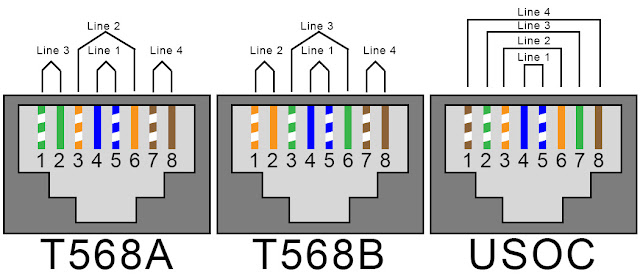
|
|
Only one coax from directv coming into the house (in the box pictured above in my garage) . From the AT&T box on the outside, there is one of the blue wires coming into the garage box. The cable company just ran lines in the neighborhood and their is a disturbution point in my yard about 10yards from my garage.
Cable coming from the phone box and ran though the house looks to be cat5e: http://www.av-iq.com/avcat/images/documents/other/CAT5EPL%20UTP%20Plenum.pdf It has rj-45 plugs in the garage box. The main issue is the the wall jacks are smaller. Currently, I do have a smaller tele to Ethernet patch cable running from the living room jack to the DSL wifi router. I already have a couple of short cat5e patch Ethernet cords for running from the router to the computer. Anyone got a suggestion on a decent wifi router? The top end for now will only be 50mbps...but maybe in the future i can get faster. |
|
Standard phone jacks are rj-11's (4 pin), so again leave them alone.
Hence the jack's at the distribution point may be rj-45's, but up stairs at the walls, female rj-11's and most of the time, only two wires punched from the cables instead (maybe all 4 is the house was set up for two lines). So with the cable company having a distribution point close to the house, they will need to run the co-ax from it, to at least a box on the side of the house. From there if you don't want to pay them to wire your house (bring the co-ax in), easy enough to run the needed coax with RG-59 connectors from it to where you want the modem, as well as new Cat5E for your patch cables from room to room as well. As for patch cable distribution point, think about it, since something it easier to just terminate the patch cables from the rooms to the A/V/phone cabinet you have in play with a switch there, or if more complex, to the server room in the house to give you a little more control of the wiring patches instead. Truth is with a Wifi router, your just going to need the Co-as to a room that you want to have your main machine at, set the modem up there, then just the patch cable from your modem to Wiri router close to the modem, and then patch cable from your main machine to the Wifi router (hard connection needed to get into the programming on the router, since it will not allow the routerlogon to be used over the wifi channels isntead). |