


Posted: 2/15/2026 8:08:46 PM EDT
|
We moved into a new house 3 years ago and have struggled with solid TV reception. We have a Leaf antenna on each TV but don't get all the channels we'd like. The house seems like a faraday cage. I've had a grand vision of putting an antenna in the attic to get above whatever is in the walls. It's taken forever, but thanks to a fiberglass rod and fiber optic camera, I was finally able to get cables from the attic into the wiring closet. I've confirmed the tower locations with several sites and everything I want to hit is within 10 degrees of each other and only 6 miles from our house. Despite that, I can't get three channels even though they're at the same bearing as channels I do receive. I've tried two different antennas, with and without a booster. The signal comes in from the antenna and terminates at a splitter in the wiring closet. I just removed the cable TV input and plugged the antenna in figuring it would fix the OTA issues for all of the rooms. I'm at a loss. I have no idea what else to try. Well, I have one other idea. The Leaf seems to do better than either of the new antennas. I think I might be able to hang it in the attic and plug it in in the wiring closet since it's amplified but I don't have yet another trip to the attic in me today. Any other ideas if that doesn't pan out? |
"The answer to crime is always cows." -Cheesebeast


|
Originally Posted By DoctorCAD: Real antennas are metal. I get 62 channels with a $6 stationary non amplified flat plastic antenna stuck to the back of my TV. This isn’t the 1970s anymore. |
Night ain’t scary when you don’t fear death. And you can’t suffocate when you don’t need breath. I’m chilling so hard the fire can’t fade me. Cause I’m all good with the one who made me.
|
Originally Posted By DoctorCAD: Real antennas are metal. Attached File Antenna 2 (Plastic) Attached File Originally Posted By TREETOP: I get 62 channels with a $6 stationary non amplified flat plastic antenna stuck to the back of my TV. This isn't the 1970s anymore. 
|
"The answer to crime is always cows." -Cheesebeast

|
You may want to look up what those three channels are in terms of frequency and power output. You may already be looking at it since you know where your towers are, but tvfool.com will show the channels and expected signal strengths. If those channels are in the weak zone it may indicate you need a better antenna than you're using. |
|
Thanks for that site. Hadn't seen it yet. This is more frustrating, though.  Two of the three channels I can't get are shown in green. Which is accurate, I suppose. But I don't get how the antenna in the living room can pick it up but a freaking yagi pointed right at the damned tower can't. Two of the three channels I can't get are shown in green. Which is accurate, I suppose. But I don't get how the antenna in the living room can pick it up but a freaking yagi pointed right at the damned tower can't. Not sure about the 2nd antenna, but the first is listed as having 12dB of gain which should be more than enough at this distance. Or maybe it's too much and not allowing the channels to be picked up. I know over-amplification can be an issue. |
"The answer to crime is always cows." -Cheesebeast
|
problems than they solve, and it's better to try using a direct to antenna cable and if that doesn't work, then try the booster. If you're using a yagi or other good directional high-gain antenna, it could be that is needs to be re-pointed, you can sacrifice some of the good signals to bring up a bad one without causing too many issues. If your TV has it, in the settings menu, some will report signal strength and you can use that as a guide on pointing. Additionally, if you have multi-path, you'll get dead zones every few feet in some cases, where relocating the antenna even a couple feet could change the signal by a very large margin. Also if the antenna is in an attic there might be building materials that are blocking that aren't present where your living room is. Radio signals are just strange sometimes. ETA: How is the first antenna oriented? It may need to be rotated 90 degrees due to polarization. Again a signal strength indicator will help a lot in determining this. |
|
Yeah, that's why I've tried with and without the booster. I wondered if it was doing more harm than good. Unfortunately, there's no strength meter. That would be awesome. I do have the antennas about 6' apart and the black one is a couple of feet higher. I'll try aiming them differently also to see if that helps. Had I thought about it, I would've done channel scans before I mounted either of them but I was expecting this to be a simple fix. Both antennas are aimed at the middle bearing for the range I'm trying to receive. I connect one, scan, then swap the cable to the other and rescan. Thanks for the suggestions. |
"The answer to crime is always cows." -Cheesebeast
Joined:
Feb 2022
Posts:
702
EE: 0% (0)
 AZ, USA
|
Originally Posted By JaxShooter: Yeah, that's why I've tried with and without the booster. I wondered if it was doing more harm than good. Unfortunately, there's no strength meter. That would be awesome. I do have the antennas about 6' apart and the black one is a couple of feet higher. I'll try aiming them differently also to see if that helps. Had I thought about it, I would've done channel scans before I mounted either of them but I was expecting this to be a simple fix. Both antennas are aimed at the middle bearing for the range I'm trying to receive. I connect one, scan, then swap the cable to the other and rescan. Thanks for the suggestions. If you're willing to spend about $30 you can get a standalone strength meter from amazon. There may be portable TVs that can do it as well, might be easier if you're in the attic tuning. I'd try aiming off bearing by about 30 degrees to one side and then slowly move in 5 degree increments. Sometimes the bearings are off, especially if it's a magentic v. true north issue they can be off a lot. Going outside with an antenna and doing a sweep can help too, if there really is some kind of material that's blocking signals. |

|
I can sympathize but I really have no advice. I have a cheap antenna that gets about 35/60 available channels. I figured I'd get a fancy, expensive antenna and get all the channels. Mounted the fancy antenna in the same spot as the cheap one and it only got 6 channels.
|
|
Originally Posted By darg508: A "booster" can only boost what it receives, if the signal is crap you get amplified crap. A high gain yagi outside beets any plastic fantastic pencil in the back of the tv. Get an antenna in the attic or roof and wire it to the tvs. Originally Posted By limestonecowboy: A lot of newer construction has a foil barrier stapled to the underside of the roof. In other words, a faraday cage. Try an antenna outside, or even through the window facing the right direction. Originally Posted By seek2: If you're willing to spend about $30 you can get a standalone strength meter from amazon. There may be portable TVs that can do it as well, might be easier if you're in the attic tuning. I'd try aiming off bearing by about 30 degrees to one side and then slowly move in 5 degree increments. Sometimes the bearings are off, especially if it's a magentic v. true north issue they can be off a lot. Going outside with an antenna and doing a sweep can help too, if there really is some kind of material that's blocking signals. Originally Posted By RiceBowl: I can sympathize but I really have no advice. I have a cheap antenna that gets about 35/60 available channels. I figured I'd get a fancy, expensive antenna and get all the channels. Mounted the fancy antenna in the same spot as the cheap one and it only got 6 channels. |
"The answer to crime is always cows." -Cheesebeast

|
Add one of these to your next Amazon order. Works GREAT for me. https://www.amazon.com/dp/B07BLNWZHS?th=1 I found it via one of his videos: https://www.youtube.com/c/AntennaMan/videos And make sure it's pointing the correct direction: https://www.rabbitears.info/ |


|
I ordered this antenna and it sits on a china cabinet just below the ceiling. It gets decent reception, but I have to point it right at the towers. I may move it to the attic or even outside. We just got fiber optic internet service and the AT&T modem/router had to be placed right by the TV, and then the TV reception went bad. I know the coax antenna signal is supposed to be shielded, but I narrowed it down to where the modem was located. i moved the modem 6 feet away from the TV in the other direction from the antenna line and now it's back to working okay. Is there anything like a modem or router that may be interfering with your signal?  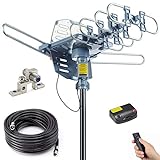
|
Don't be so open-minded that your brains fall out.
General education should not be mere job training, but training in how to be fully human.
General education should not be mere job training, but training in how to be fully human.
|
Originally Posted By MRW: I ordered this antenna and it sits on a china cabinet just below the ceiling. It gets decent reception, but I have to point it right at the towers. I may move it to the attic or even outside. We just got fiber optic internet service and the AT&T modem/router had to be placed right by the TV, and then the TV reception went bad. I know the coax antenna signal is supposed to be shielded, but I narrowed it down to where the modem was located. i moved the modem 6 feet away from the TV in the other direction from the antenna line and now it's back to working okay. Is there anything like a modem or router that may be interfering with your signal? www.amazon.com/dp/B07JN6FNZ4 I got real excited when I told my boss. He said he had a similar issue and solved it with a LTE/5g filter. Well, Amazon delivered that a few min ago and didn't change shit. Well, it actually made the signal less stable like the 2nd antenna.  So, for now, I've given up until I have some time to get back into the attic. On the two attic antennas, I either get 14 or 17 channels. Mostly 14. So I hooked the Leaf antenna up that sits on the cabinet next to the TV. Attached File 71 freaking channels from the living room, 14 from the attic. I wonder if it's the splitter or the cable. If I can find it, I have a coax fox/hound I can use to figure out which cable is going from the splitter to the living room. If I can isolate that, I can use a barrel connector to bypass the splitter to see if that's the issue. |
"The answer to crime is always cows." -Cheesebeast

|
Originally Posted By JaxShooter: snip 71 freaking channels from the living room, 14 from the attic. I wonder if it's the splitter or the cable. If I can find it, I have a coax fox/hound I can use to figure out which cable is going from the splitter to the living room. If I can isolate that, I can use a barrel connector to bypass the splitter to see if that's the issue. You have a splitter on your antenna cable to the attic? That's a pretty important bit of information! I'd not only bypass, I'd disconnect both ends and confirm there's no DC continuity between shield and the center conductor, then short one end and confirm there is continuity. Every 1:2 split is removing more than half the signal. It's a big deal. It's also a big deal if you have split signals and any of the ports are unterminated, as you can get the signal reflected back out of phase and that can completely wipe out selected channels. |
|
Originally Posted By seek2: You have a splitter on your antenna cable to the attic? That's a pretty important bit of information! I'd not only bypass, I'd disconnect both ends and confirm there's no DC continuity between shield and the center conductor, then short one end and confirm there is continuity. Every 1:2 split is removing more than half the signal. It's a big deal. It's also a big deal if you have split signals and any of the ports are unterminated, as you can get the signal reflected back out of phase and that can completely wipe out selected channels. I hadn't thought about checking continuity. And there are ports on the splitter that are unused. Maybe I need to get some terminators for them. Appreciate all the suggestions. |
"The answer to crime is always cows." -Cheesebeast
|
Well, it definitely looks like the splitter is the most likely culprit. I found the battery powered digital TV I had packed away and connected it directly to the antenna. The results were amazing. The odd thing is that despite all of the new channels, I was still missing NBC. Since it cooled off again (homey ain't going in the attic when it's 86 outside) I'm going to try to connect it to the other antenna. I have a new splitter on the way. This is a far cry from the 14 I got on the living room TV! Attached File |
"The answer to crime is always cows." -Cheesebeast
|
The Good News I went into the attic with my portable TV and connected it to the second antenna I bought. I got every single channel I'm after!!!! The Bad News I get NBC now, but FOX barely comes in. I can't freaking win. And...I don't think it's the splitter after all. I'm estimating we have 8 cable jacks throughout the house which aligns with the fact that it's a 8-way splitter. Only 3 cables were connected. I labeled each cable and put my tester on each one. Out of the 8, I was only able to ID 2 of them and both, unfortunately, are in the master bathroom. Don't ask why we have two TV jacks in the bathroom, but we do. Behind the living room TV is an A/V panel. It has 3 coax connectors: 1 marked cable and 2 marked aux. I put a test receiver on each one and not a single one was ID'd. Now I'm going to have to pull it to see if there's even anything behind the connectors. I also had one upstairs in and I couldn't find a match for it, either. Why is it that nothing is ever easy? |
"The answer to crime is always cows." -Cheesebeast
|
That's a lot of signal splitting. Presumably the plan was to run a booster from the antenna into the splitters to overcome all the losses. I wouldn't be surprised if there's another location where most of those cables lead. Not being connected would explain a lot about the signal losses! You might want to look outside and see if there's a CATV distribution box with a lot of cables terminated inside. |
|
Originally Posted By seek2: That's a lot of signal splitting. Presumably the plan was to run a booster from the antenna into the splitters to overcome all the losses. I wouldn't be surprised if there's another location where most of those cables lead. Not being connected would explain a lot about the signal losses! You might want to look outside and see if there's a CATV distribution box with a lot of cables terminated inside. Originally Posted By seek2: That's a lot of signal splitting. Presumably the plan was to run a booster from the antenna into the splitters to overcome all the losses. I wouldn't be surprised if there's another location where most of those cables lead. Not being connected would explain a lot about the signal losses! You might want to look outside and see if there's a CATV distribution box with a lot of cables terminated inside. Now that I realize the other 6 cables don't seem to go anywhere, I'm definitely wondering if there's something I'm missing. Of course, nothing is labeled, and this is just one problem. This is the kind of ghetto shit I'm dealing with. I'm guessing it's for the intercom (which uses Cat 5) but I have no idea. Attached File I ordered a patch panel and gigabit switch designed for the cabinet. The networking is atrocious as well. Originally Posted By MRW: when old men have nothing to do, no problem to chew on, we die. Consider problems a blessing. Well, I guess there's that. 
|
"The answer to crime is always cows." -Cheesebeast
|
Well, I think I've finally nailed down the root cause of my issue...the freaking cable in the wall. I got a new splitter yesterday which yielded the same results. I also put 75 ohm caps on every unused jack. In the living room, 20 channels. In the closet, 80. The only thing I hadn't swapped at this point is the cable in the wall. So today, Home Depot delivered a shiny new 50-ft cable that I ran across the floor from the closet, through the bedroom, and into the living room. 60 freaking channels!!!! Including the ABC and NBC which I kept losing with every other configuration. So it looks like I'll at least be rewiring from the closet to the living room. I guess I'll have to go room by room to keep trying to ID the rest of the cables to see if I can find any more matches and see what the results are there. I appreciate everyone's suggestions. Sure was hoping it was the splitter. Now I have real work to do.
|
"The answer to crime is always cows." -Cheesebeast
|
2/27 UPDATE I had a huge success today, and a little more confusion. There's been a cable which comes into the wiring closet and is barrel connected to another that goes back out. It had a piece of tape that said DirecTV so I'd ignored it. Well, I pulled the A/V panel from behind the living room TV to get ready to run a new cable and decided to try once more. This time, I tested that cable and I'll be damned if that wasn't the one to the living room! So I don't have to run a new cable after all. I'm now connected over the existing cable, through the existing splitter, to the new antenna. All channels, all strong! No effin clue what the barrel connector was for but I'm puling the other cable to get it out of the way. Now for the puzzling bit. I'd ID'd one of the aux jacks. Cable. Aux. Aux. The middle jack isn't connected to anything. That's when I noticed something I still can't explain. The cable is black. The cable I ID'd in the closet is white. Maybe it did a reverse Rachel Doleanz? But no. This is where it gets really strange. Now that I know it's black at the jack, I start testing the black cables in the closet, even the two without a connector. NONE of them lit up. I go back to the cable I'd ID'd and the black pass indicator comes on (I have 4 color-coded testers). I go back to the living room and put the green receiver on it. Hit the test button, green stays out, black comes on. WTF??? I'm holding the black receiver in my hand. There should be no way the tester is passing. It should be open. I can't imagine what in the world they needed another coax for, though, so I think I'm just going to rip it out as well. But I'm slowly getting things back on track. The closet is shaping up nicely and I can't wait to show the before/after pics. With any luck, I'll get the network cable run tonight so I can stream over the wire vs over WiFi. |
"The answer to crime is always cows." -Cheesebeast
|
Every split costs you signal. Physics doesn't lie. What you need to do is eliminate all connections except the one at the antenna and at the TV and try again. If the distance between the antenna and the TV is greater than 50 feet, you will need a pre-amp. It boosts the antenna signal enough to overcome the length of the cable. If you want to split the antenna cable for more TVs, you need a distribution amplifier, they come with 2 to 8 (or even 16) outlets that boost the signal enough to overcome the splits. But first, run a rabbitears report to see what's available at your location. |
|
Thanks. Things are starting to get sorted out. I made a lot of progress this week. I have three rooms working as designed. I switched the living room and my mom's bedroom to the new attic antenna and they're working like a champ. In fact, my mom just came in to say goodnight and said her TV hasn't blipped once since I switched her to the antenna. Previously, she'd have trouble at night with glitchy signal strength. I still can't ID everything, though. I have a lot of cables and no idea what they go to. What really pisses me off is that there isn't much I can do about them. I'd planned on ripping out anything I can't ID (or the cables that don't even have a connector). Unfortunately, as I was running some Cat6 today, I noticed that not only are a lot of the cables stapled to the studs, there are also bunches taped together. There's no way I can pull out the dead ones.  I may just end up cutting them off at the top of the cabinet. I may just end up cutting them off at the top of the cabinet.The great news is that I was FINALLY able to put a network drop in my office rather than the 100' cable running from the closet through the house. I have to say that the endoscope I bought has been a tremendous asset. It's helped me guide the fiberglass fish rod right where I need it. I'd link to it but it's not available on Amazon anymore. |
"The answer to crime is always cows." -Cheesebeast
|
Do you have a wire tracer or tone generator? Most kits have two pieces - a tone generator and a tracer. Clip the generator on a wire in the closet, then go to each room and use the probe to detect a signal. Tone Generator and Probe Kit |
|
Originally Posted By Moondog: Do you have a wire tracer or tone generator? Most kits have two pieces - a tone generator and a tracer. Clip the generator on a wire in the closet, then go to each room and use the probe to detect a signal. Tone Generator and Probe Kit For example, the back bedroom ended up having two network drops. The have grey cables. I did have a single grey cable dangling loose in the cabinet. When I tested it, nothing happened. I might be able to trace it through the attic, but I've discovered that most of the cables are a) stapled to the studs and/or b) taped together in cable bundles. If I do manage to follow it to the closet, the odds of finding it are slim. I can't pull on it to see if something moves inside. No idea why they'd go through the trouble of wiring jacks but not route them anywhere, but not a lot makes sense about how things were done. |
"The answer to crime is always cows." -Cheesebeast