


Posted: 5/24/2007 8:51:07 AM EDT
| I'm not very comp savvy. Can someone tell me how to post pictures? Thank You! Andy |
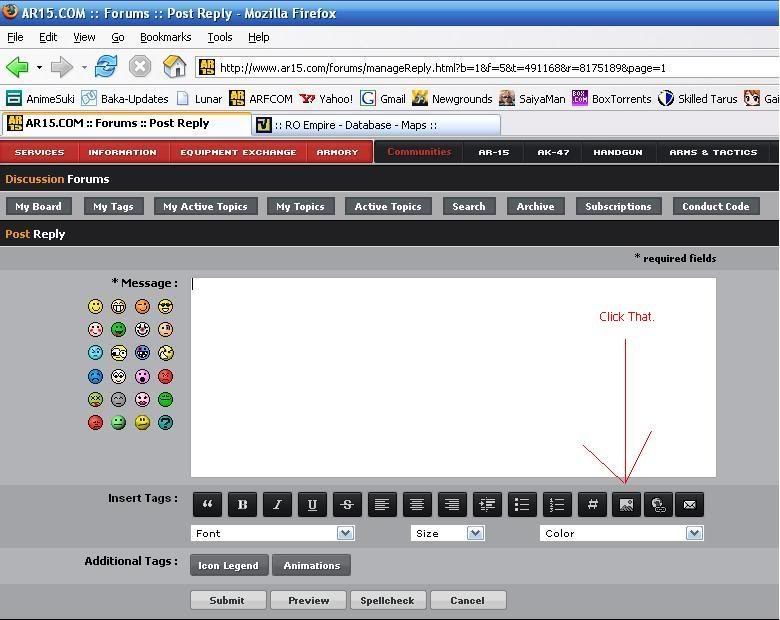 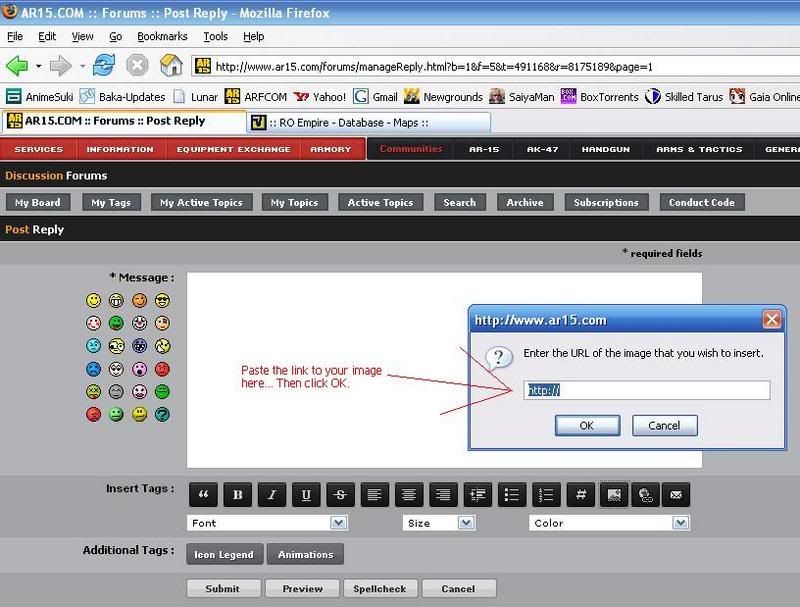  Edited to add: to get the image link you need to upload your picture to a hosting site somewhere... Like ImageShack or Photobucket both are free google them. Image shack does not resize images. Photo bucket resizes them to make them smaller and that size is usually about right to fit the screen of most people... |
|
Background: Pictures have to be hosted on a server directly connected to the net. There are a few free hosting sites available, I use Imageshack.us. To upload an image from your computer, click Browse and follow the dialog box to your picture location. Select your pic and click Open. Once back at the web page, click Host it! button at the bottom of the text. Eventually you will get a page that has the URLs of the hosted picture. Click on the one that is labelled: "Direct link to image" to highlight it, the right click on it to copy it. To post the image here, click the icon with the mountain and sun in it and paste the URL you copied into the dialog box. Click OK, and the proper format will be inserted into your reply. Hit the preview button to see if it worked. |

This is the #1 problem people have. Your internet service provider may give you web space for a home page. If so, you can upload images to that space. Directions vary depending on your internet service provider. |


