


Posted: 3/24/2007 10:50:17 AM EDT
|
I have 3 computers in my house. 1 is in my office, one in the master bedroom (it is a laptop), and one in a bedroom (it is a Fry's E-Machine). Currently, I have Cox high-speed cable internet, so the Internet connection runs out of the wall and connects to my computer in the office via a cable modem and an ethernet cable. The other 2 computers have no Internet, as Cox says they cannot rent us extra modems unless we sign up for extra accounts - to the tune of almost $50 each per month. They suggested a wireless network, but I am lost. What I want to do is have a wireless network where I have the one cable modem here in my office, and the other 2 computers have Internet access without running a standard router and stapling wires to my ceiling. Hence, a wireless system where all 3 computers have access to the Internet autonomously from each other. The laptop in the MB is running 98, the other bedroom is running XP Home, and I am running 2000 Professional. What do I need to buy/do to make this work? 
|
|
+1 on the advice above, it's not that difficult. You also need wireless cards for all your computers (more likely than not all of it will be 802.11G). The only problem arises if your computers cant get a decent signal in the bedrooms etc. Depending on construction and distance it could be an issue. |

So no cards are needed if there is a decent signal to all computers? The bedrooms are about 35 feet and 50 feet apart from where the router will be in an L shape. |
|
1.Does the laptop have wireless buit in? 2. Does the other computer have a wireless card? Fora wireless network to work, you need a wireless router (since you don't have a router now). It gets plugged into the modem via CAT 5 cable. The computer near it can be connected to the router via CAT 5 (a router will have 4 or so Ethernet jacks on the back). The laptop and the other bedroom computer will need wireless cards. The laptop may have one buit in. The other bedroom computer will need a wireless card or a USB wireless adapter. Encrypt your network using the computer hard-connected to the router. Turn of the SSI (the ID of the wireless network - change it to something other than the default) broadcast and use WPA-PSK TIKA encryption. You'll have to set up the SSI and encryption key on the wireless computers (do all of this this after its all up and running). Best way to put the encryption key on the other computers is to cut and paste the key you generate into a text file and save that to a jump drive - then cut and paste it. You set up the encryption under the properties of the wireless connection (and tell it the SSI of the router) |
No, each PC needs a wireless card unless it has wireless built into the system. If not you will need two wireless cards for the two remote computers and a wireless router for the office system. Make sure the cards and the router are the same type (eg. 802.11B/G/whatever). Upgrade that 98 laptop too. XP and wireless are a lot easier. |
No, all the computers that will be using the wireless need a card, sorry if my post was confusing. For example you can get a wireless router and 2 wireless cards (one for each bedroom computer) but leave your office computer hardwired (assuming your router will be placed in the office). Or if you want, you can have all 3 on wireless. Also please note that wireless cards for laptops are different than those for desktop PC's, so make sure you get the right kind. (PCMCIA vs PCI: PCI for a desktop, PCMCIA for a laptop) I've never had good luck with wireless range, which is why I brought up signal strength. When I was living at my mom's house (historic adobe brick) I could barely get signal to my computer only 15 feet away from the router (mostly due to wall construction), so we had to do all sorts of weird shit for me to get signal. |
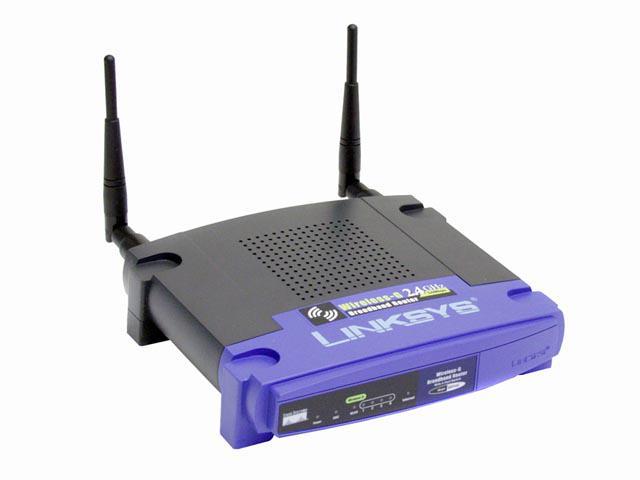 Linksys Wireless router (also has 4 wired ports built in). This hooks between the main computer and the cable modem with network cables.  PCI wireless card for the eMachine. As an alternative, you could use a USB external adapter instead:  And for the laptop, you'll likely need a PCMCIA adapter:  I used Linksys in these examples mostly because they are the industry leader and are known to work well, but you generally won't have problems with most brands. One potential exception would be the laptop, and that's because it's running Win98. Many wireless adapters require Win98 SE1 or newer to work; you'd need to check which version you're using and check with the manufacturer (or look at the box). Once all that is installed, getting it running is fairly simple. -Troy |
Thank you much! I got a brand new copy of XP (Home) for the laptop (which is Beth's, not mine) so that should take care of the compatibility issues. The rest of it seems really simple by your explanation. Almost plug and play. |
|
I had good luck with the USB 802.11b/g adapters that can be found for ~$30, they work even with ME. But I haven't tried 98...I am still stuck on 2kP because of some applications and licensing.. For my laptop. a Dell C610, it has Mini PCMCIA slot with dual built-in antennas. I got the Intel Proset 2200 BG card for $20 and used the Intel drivers. Couldn't have been easier and with the antennas, it easily gets full signal from my Linksys up to 300 feet outside the house. The USB wireless adapters can be installed with a short extension cable for better reception. |
It can be, or it can be a real pain, depending on signal strength. IIRC, you're an electrician. If you're having signal strength issues, you may just want to route Cat5 cable, and go hardwired. If you can't or don't want to do that, and are still having signal strength issues, you can get more powerful antenae for both the router and the cards. Either way you'll still need a router/switch, which the wreless router has built in, and they provide a layer of security from the 'net. Once you get the cards and routers set up, make sure to get the security in place on the wireless side. It'll probably be easier to start a new thread then, with the make/model of the router. |

Shouldn't have to do anything for that. They will all be part of the same local network behind the router. They are now networked. Just share the printer on the main machine. |
It's fairly easy once you get them all so they can get to the internet. Once they are at that point all the machines are on the same local area network (LAN). All you really have to do is share the printer from the computer that it's connected to and point the other machines to it. |
I meant to add in mine that you'll also probably need to make firewall rules to let the traffic in to the computer hosting the printer. |
I'd consider putting a static IP address on the machine that's sharing the printer. Then you can just reference the IP rather than have to have a name resolved. |
I have absolutely no idea what in the world you just said, but it sounds important enough to listen to, so thank you. 
|
It is easy to do on the router (the thing that connects and concentrates multiple computers onto one Internet connection). Most routers use Dynamic Host Control Protocol, fancy speak for "automatic IP addresses". Each computer gets its own IP based on when it connects and what addresses are available. Most home routers are configured for the same IP, that being 192.168.1.1 and the first connecting computer gets the IP of 192.168.1.100, the next is 192.168.1.101 and so on until all IPs are used. Now you see why a resource being shared should have DHCP off and a static IP so all other computers can find it based on the IP alone. To the outside world, the sole Internet connection looks like a single computer but with the IP address the ISP has provided. The router does its magic by remembering what computer connected to it is communicating with an outside source. On any wireless router, you should turn off wireless router management as well as remote. Wireless management could allow a hacker access via wireless. And remote? They can be anywhere and get access as long as the router is connected to the ISP. |