


Posted: 5/29/2013 6:58:23 PM EDT
|
I would like to create an Access database that will help with ordering some supplies at work.
What I'm looking to do: I want to create a basic database that I can enter a current inventory of supplies and a minimum amount of each supply that I need on hand which I could then generate a report via Excel or Word that will let me know what I need to order. I'm not familiar enough with Access so I don't really know where to begin as far as searching online to find out how to get started. I'm hoping someone here has enough experience that they know the proper search terms for Google that can get me started. Once I can get started, I can pretty much figure it out by playing around with it. Basically, can someone provide me a good link that will help me out? |
|
Use a Microsoft Access template.
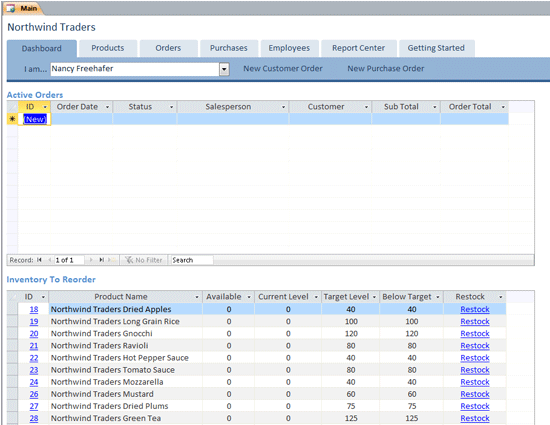
What version do you have? 2010? 2013? 2003: Inventory Management database template In 2013, an asset tracking database included. Or open a new database and use the search tool to look for the appropriate template. The 2007 Northwinds database example is a good place to start. 1.Open Microsoft Access 2010 On the New tab (opened by default when you start Access), select Sample Templates under the Available Templates section. Click on Northwind. On the right side of the screen, provide a filename for your Northwind database in the File Name textbox. Click the Create button. Access will download the Northwind database from Microsoft and prepare your copy. This may take a few minutes. Your database will open automatically when it is ready. 
|
|
My advice isn't in line with what you want, but I've found that Access databases are a "great in theory" type of deal. What usually happens is one will be created then modified by one person extensively. It'll work "ok" for awhile until that person leaves. Then it will linger on until it finally dies, and by then, no one will know what has been done with it so that they can fix it or actually have the skills and ability to do so.
Ironically, I was just now picking through the leavings of our last Access expert, trying to sort out what was done so another user could use the database that they need to keep limping along and doing business. This is a BILLION dollar corporation I work for, mind you. Long story short: almost everything you need could be done with Excel. To actually answer your question on topic, however, I once used the site www.experts-exchange.com, but it's pay now. The people there could answer anything. |
|
Quoted:
My advice isn't in line with what you want, but I've found that Access databases are a "great in theory" type of deal. What usually happens is one will be created then modified by one person extensively. It'll work "ok" for awhile until that person leaves. Then it will linger on until it finally dies, and by then, no one will know what has been done with it so that they can fix it or actually have the skills and ability to do so. Ironically, I was just now picking through the leavings of our last Access expert, trying to sort out what was done so another user could use the database that they need to keep limping along and doing business. This is a BILLION dollar corporation I work for, mind you. Long story short: almost everything you need could be done with Excel. To actually answer your question on topic, however, I once used the site www.experts-exchange.com, but it's pay now. The people there could answer anything. If you use Excel, again you can start with a template: Excel templates Yes, Access databases are the bane of the IT department. It's not that Access itself is a bad product, it's just that it used by non-IT people and the databases grow in complexity based on the actual requirements until they become full blown IT systems that should have had all of the processes that are required for a professional system, such as proper analysis,funding, documentation, source control, testing, etc. |
| My advice would be to BUY a real inventory management system that easily does what you need. No good can come of being cheap because you already have something that sort of does what you want you want to try to build something. Access has some severe limitations, especially when you get a sizable database file. |
|
Quoted:
My advice would be to BUY a real inventory management system that easily does what you need. No good can come of being cheap because you already have something that sort of does what you want you want to try to build something. Access has some severe limitations, especially when you get a sizable database file. 2 gig limit on the database file. It all depends on what the user really needs and has. How many items is he going to inventory? Multiple users of the database? Web access? Does he have a file, database, or web server? Someone to manage all of these? |
|
Quoted:
My advice isn't in line with what you want, but I've found that Access databases are a "great in theory" type of deal. What usually happens is one will be created then modified by one person extensively. It'll work "ok" for awhile until that person leaves. Then it will linger on until it finally dies, and by then, no one will know what has been done with it so that they can fix it or actually have the skills and ability to do so. Ironically, I was just now picking through the leavings of our last Access expert, trying to sort out what was done so another user could use the database that they need to keep limping along and doing business. This is a BILLION dollar corporation I work for, mind you. Long story short: almost everything you need could be done with Excel. To actually answer your question on topic, however, I once used the site www.experts-exchange.com, but it's pay now. The people there could answer anything. yep |
|
My experience with Access is using it as an analytical and reporting tool so the help I can offer is limited until you need advice on cleaning data or mining it for info.
Excel is easier to use if only you will be touching the data and your table will have less than a million rows. The other benefit of Excel is that the learning curve won't be as steep. With Access you play the parts of the business analyst, the database architect, the database admin, and the database developer as well as the database user. In skilled hands Access can be a way better tool than Excel - but it takes a long time to develop that skill. That said, if you still want to use Access it's best to find an expert to learn from and a book. Ideally you have an Access expert to consult at work. You can try googling "Access User Forum" to find out what Access users in the real world talk about in online forums as well. Learning Access online is much harder than having someone around to show you the basics and answer questions though. What you want to do is a commonplace small business use of Access. There are enough wizards and templates to get you started on it but it will probably take quite a while if you are totally new to Access. Long enough that using Access might not be the best use of your time. This last bit is important: Save a back up of your database regularly. Access is awesome until your application with all your data decides to shit the bed at 6 PM and you have work all night to rebuild the fucker. |