


Posted: 7/21/2024 4:33:16 PM EDT
|
Someone asked about the settings I used on a few projects so I figured I would add them here in case anyone can use them. I have a 50W Fiber Laser. I use a 110mm and 175mm lens most of the time depending on what fits. Settings: UPDATE: I just discovered a formula I did not know before. I was using trial and error however this formula gets you the frequency needed for max power output. Take your advertised power rating and divide by the max pulse energy and it gives you the frequency for maximum power. So for my JPT M7 80W: Laser Power JPT 80W / Max Peak Pulse 1.5 = Max 53.3333 Frequency or 53 mHz For the MAX 50W below: Laser Power Max 50W / Max Peak Pulse 1.5 = Max 33.3333 Frequency or 33 mHz The manual for the JPT also shows the Q-Pulse cut off scale so on that a Q-Pulse of 500ns. Aluminum Deep Attached File Attached File Engrave Steel Attached File Attached File Attached File Attached File Color Cerakote Aluminum FDE Attached File Sand Attached File Tan Attached File Color Cerakote Steel Bronze Attached File FDE Attached File Green Attached File PMAG Brown Attached File FDE Attached File Gray Attached File Light Gray Attached File Light Camo Brown Attached File Light Tan Attached File Glock Stipple Attached File Examples: Attached File Attached File Scrap lower I used for dialing in the settings: Attached File Attached File          |

|
Quoted: @OG1 What laser are you using? Is there a newer model out now that you would recommend? |
|
Quoted: Thanks @OG1 !! Can't wait to try these out once we get back from vacation! https://github.com/shark92651/LaserParamsConverter (Direct link may work from here but if not just use above and dl the zip) https://github.com/shark92651/LaserParamsConverter/archive/refs/heads/master.zip |
|
Quoted: I got this one https://www.ebay.com/itm/126166158159 (they threw in the rotary free after adding to cart as an incentive) using a Max 50W laser source. You can do the same with a cheaper 20W it just takes longer. If you want to do colors on stainless look into a MOPA. If I had it to do over again, I really want the Monport GA 100W, it does a lot and they have deals much cheaper for on ebay than the website. Insane how cheap fiber lasers are getting. I got my Monport 30w on Ebay for $1,800 with a Raycus source and no rotary. But I agree, if I had to do it all over again I'd get a JPT MOPA. |
|
Quoted: Thank you very much. I was coming here to ask for some help with deep engraving in steel. This was exactly what I needed. I ran the aluminum settings with a global of 3 instead of 2 on this one and really like the way it came out: Attached File |
|
Quoted: Awesome. Just run as many passes as it takes on your machine to get to the depth you like. The settings for that will work on any lens or power, I keep that the same on all 3 lenses I have but go deeper on the 70mm and 110 of course. The frequency is also where the depth comes in, run that as low as your machine will allow. I ran the aluminum settings with a global of 3 instead of 2 on this one and really like the way it came out: https://www.ar15.com/media/mediaFiles/289319/airforce_jpg-3275710.JPG That turned out great, I may have to do one. My friends son just joined the Air Force. just tried those settings, got good results but it doesnt look like im getting as much depth as you. I have a 100W MOPA. ran it at 75% power. Still need to play around more with it. Also for the Scroll work you've done, are you designing it yourself or using software? |
|
Quoted: That turned out great, I may have to do one. My friends son just joined the Air Force. just tried those settings, got good results but it doesnt look like im getting as much depth as you. I have a 100W MOPA. ran it at 75% power. Still need to play around more with it. Also for the Scroll work you've done, are you designing it yourself or using software? Attached File Attached File |
|
Quoted: Absolutely amazing work! Quoted: Nice work. Thank you for sharing your settings. |

|
Quoted: ... I ran the aluminum settings with a global of 3 instead of 2 on this one and really like the way it came out: https://www.ar15.com/media/mediaFiles/289319/airforce_jpg-3275710.JPG Quoted: Thank you both very kindly. I have upgraded to an 80W JPT ... Are you working with images or vectors? Directly in Lightburn or in something else for layout then importing? I'm doing prep work in Inkscape, but final designs don't transfer over as cleanly as I'd like. Mmmm... 80w JPT.... Tease Me Harder Daddy!! (nope - not at all jealous, why do you ask?  ) ) |
|
Quoted: That's some nice, clean cutting. Are you working with images or vectors? Directly in Lightburn or in something else for layout then importing? I'm doing prep work in Inkscape, but final designs don't transfer over as cleanly as I'd like. Mmmm... 80w JPT.... Tease Me Harder Daddy!! (nope - not at all jealous, why do you ask? ) |
|
I've been having a hell of a time working out numbers for cheap white acrylic dice. So far, on a 20w Raycus, 110 lens, I'm at 800mm/s, 40%, Freq 60, line 0.05, and anywhere between 1 and 10 passes (solid images lower, thin vectors more) I may give in and sacrifice more to a material test matrix or two now that I have a rough range to look at. |


|
Awesome work and design. Where do you hide the serial number? |
|
Quoted: Nice work! For laughs, I was thinking a Mattel branded lower would be cool, or the Tupperware logo on a polymer pistol frame. |
|
Quoted: Nice work! For laughs, I was thinking a Mattel branded lower would be cool, or the Tupperware logo on a polymer pistol frame. I found a post from around 2010 where someone made a nice PSD of it and offered it around, but, well, anonymized archives and all that. :-/ |
|
Quoted: About how long does a roll mark burn like the armalite one you show take and what is the actual depth? I presently have a CNC router and am seriously thinking about getting a laser, your handy work is giving me a big push. Here is a quick video I did using the diamond drag method. 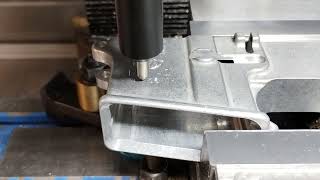 Diamond Drag Engraving with a Tormach TTS Diamond Drag kit. |
|
So you have upgraded to the JPT 80w, would that be the one that they refer to on Ebay as a Preeneex? Are you happy with it? You obviously are very experienced. I see a lot of negative comments about just about all of the manufacturers (Monport, Omtech, etc) on places like Reddit. Is that because a lot of the people are not very technically competent and the manufacturers don't provide much support or are these Chinese made lasers truly not very reliable?.....Thanks for any input, Mike |
|
Quoted: So you have upgraded to the JPT 80w, would that be the one that they refer to on Ebay as a Preeneex? Are you happy with it? You obviously are very experienced. I see a lot of negative comments about just about all of the manufacturers (Monport, Omtech, etc) on places like Reddit. Is that because a lot of the people are not very technically competent and the manufacturers don't provide much support or are these Chinese made lasers truly not very reliable?.....Thanks for any input, Mike https://www.youtube.com/watch?v=I_M19yy4G9g&list=PLoBR3k35202Yjc1yMfPZsY8EDh_pmcaa2 
|
|
Thankyou thankyou thankyou, That video you recommended was exactly what I needed at this point in time. It sorts out a lot of the jargon, brand names and technology types. I am just starting my trip into the world of lasers and although I have experience in CNC and other manufacturing processes I knew nothing about lasers. It seems to be a fast moving technology and a lot of information out there that is more than a year old is pretty much obsolete. Thanks again, I'll probably be back with more questions seeing as firearms are also a hobby of mine. |
|
Quoted: Thankyou thankyou thankyou, That video you recommended was exactly what I needed at this point in time. It sorts out a lot of the jargon, brand names and technology types. I am just starting my trip into the world of lasers and although I have experience in CNC and other manufacturing processes I knew nothing about lasers. It seems to be a fast moving technology and a lot of information out there that is more than a year old is pretty much obsolete. Thanks again, I'll probably be back with more questions seeing as firearms are also a hobby of mine. |

|
I just got my personal 60w MOPA galvo powered up today. Drivers and software are installed and I did a test run on some scrap mild steel. I've got experience at a couple of different jobs with large format KERN CO2 gantry lasers and a 40w galvo fiber marker. EzCad is what the 40w fiber used so I know the basics with it. I'm brand spanking new to Lightburn though. I have to click around in there to figure it all out. I'll be referencing your settings to help with that. |
|
Quoted: I just got my personal 60w MOPA galvo powered up today. Drivers and software are installed and I did a test run on some scrap mild steel. I've got experience at a couple of different jobs with large format KERN CO2 gantry lasers and a 40w galvo fiber marker. EzCad is what the 40w fiber used so I know the basics with it. I'm brand spanking new to Lightburn though. I have to click around in there to figure it all out. I'll be referencing your settings to help with that.Awesome! The settings change for every machine but it will get you in the ballpark. I just did the outlines in Lightburn for a Sig 365 and it is just so easy to use after you get the hang of it.   ^ Those did not come out the way I hoped. I have found fine details don't translate well so larger shapes are needed.  I designed a rat rod themed lower and engraved and machined it. It is pretty cool but also has very fine details that are hard to see.         
|
|
Quoted: @OG1 I finally had some time to play with my laser and try your settings. Setup light burn and imported the laser settings that came on the thumb drive they included with my laser. On the aluminum deep which lens are you using ? How many passes does it take for you to get some actual depth? I cannot go down to 20hz my lowest setting is 45, does that make a big difference? I have a 150mm lens (set to 332mm above workpiece per manual) and using your settings it removes the black coating in the hard coat anodized aluminum scrap receiver I'm practicing on but there's zero depth in the actual aluminum. Certainly not to ATF spec for a NFA engraving. Would a smaller lens work better? Manufacture offers 70,110,150,175,200&300mm for my laser. 2. Focal length is absolutely critical to a proper engraving. On my current machine my focal lengths are as follows: lens used / Distance From Part 70mm - 7mm 110mm - 75mm 175mm - 177mm 300mm - 390mm That being said. 322mm above workpiece for yours is way to far away IMHO. You need to find the perfect focal distance for your machine and record that like I did above. One way to do that is make a basic shape say a .25 square or 1" square and set to fill not outline. Use you most powerful settings and 45khz is just fine. Then start close to where you think you need to be. For example, you have yours already dialed in 332mm above the part so fire it up then start lowering the z axis and as you do, it will get louder and brighter. When you get to the loudest/brightest position then feather it up and down to get very precise and record your height then either make a focal stick or way to measure. I installed a mini DRO on mine and use a height gauge. Here is a good vid on it with the sound and visual.  Find Your Lasers OPTIMAL Focal Point with LightBurn for Galvo |


|
Quoted: 1. The 150mm lens should be fine. The closer you are the faster and deeper the burn. I have a 110mm that is pretty ideal I would swap for the 150mm but I suggest you keep ot to give yourself room if you need to have a wider work area. For example, I did some pistol slides with a 110mm. It was much much faster however I had to angle the part diagonally to make it fit where as the 175mm let me keep it horizontal which made it much easier to align. My 300mm lens is useless to me pretty much. I do also have a 70mm that is crazy fast and deep but you have to be so close it is only really good for coins and such. Which brings me to #2 2. Focal length is absolutely critical to a proper engraving. On my current machine my focal lengths are as follows: lens used / Distance From Part 70mm - 7mm 110mm - 75mm 175mm - 177mm 300mm - 390mm That being said. 322mm above workpiece for yours is way to far away IMHO. You need to find the perfect focal distance for your machine and record that like I did above. One way to do that is make a basic shape say a .25 square or 1" square and set to fill not outline. Use you most powerful settings and 45khz is just fine. Then start close to where you think you need to be. For example, you have yours already dialed in 332mm above the part so fire it up then start lowering the z axis and as you do, it will get louder and brighter. When you get to the loudest/brightest position then feather it up and down to get very precise and record your height then either make a focal stick or way to measure. I installed a mini DRO on mine and use a height gauge. Here is a good vid on it with the sound and visual.  https://www.youtube.com/watch?v=s4NCh2z3BSE https://www.youtube.com/watch?v=s4NCh2z3BSEThank you! Got it dialed in and using your settings it came out perfect! |
|
Quoted: https://www.ar15.com/media/mediaFiles/289319/1000002117-3347616.jpg https://www.ar15.com/media/mediaFiles/289319/1000002119-3347617.jpg https://www.ar15.com/media/mediaFiles/289319/WIN_20241012_12_05_07_Pro-3347630.jpg https://www.ar15.com/media/mediaFiles/289319/WIN_20241012_12_40_31_Pro-3347652.jpg https://www.ar15.com/media/mediaFiles/289319/WIN_20241012_13_08_24_Pro-3347695.jpg https://www.ar15.com/media/mediaFiles/289319/WIN_20241012_12_59_21_Pro-3347690.jpg https://www.ar15.com/media/mediaFiles/289319/3-3347963.jpg @OG1 did you purchase these Colt files or are they available for download somewhere? Any sites you’d recommend for firearm related files? I see a ton of stuff on Etsy . I purchased a nice set of fixtures on Etsy to hold various firearm parts flat and level while engraving.. ar receivers, pistol slides, pmags, etc |
|
Quoted: @OG1 did you purchase these Colt files or are they available for download somewhere? Any sites you'd recommend for firearm related files? I see a ton of stuff on Etsy . I purchased a nice set of fixtures on Etsy to hold various firearm parts flat and level while engraving.. ar receivers, pistol slides, pmags, etc |
|
I'm working up some sideplate markings for a close friend and have a question - where/when was the change from Colt's MFG to Colt Defense? So far I have pics of an Ar15-A3, le6920, cr6920, and M4 Commando, and they're all the newer Colt Defense. edit - Wiki says they split in 2002 with CD taking the mil, le and 'private security' market. I guess it makes sense, but I never thought of Civvy 6920s as LE/Gov. |
Tried out a laser stipple on my 43x October 16, 2024 |
|
That is perfection! Looks outstanding!
|
|
Quoted: That is about state of the art at this point. For most of that pony logo work, the font needs to be helvetica condensed bold, and the SAFE / SEMI ? Auto in helvetica bold 2.5mm high. Quoted: That is about state of the art at this point. For most of that pony logo work, the font needs to be helvetica condensed bold, and the SAFE / SEMI ? Auto in helvetica bold 2.5mm high.
|