


Posted: 11/6/2010 9:56:25 AM EDT
|
I've got a TV question for those that might know more.
I have a 46" Sony Rear Projection TV that over the past few years has been going bad. A few years after purchasing service techs replaced a bulb that went out under warranty. Now for the past 3-4 years or so I have had another blue bulb going out but multiple companies quoted me around $800 for a replacement and then I have 2 more which they state will probably be going out soon. Now most companies won't even work on it as they don't carry parts for it anymore. (10yrs old). So I had recently decided that I just need to pull the plug and replace it with a LCD, or LED TV. However after reading some online articles I found multiple disturbing opinions about picture quality using analog cable. I have Time Warner basic cable now with roadrunner internet service, and don't want to pay even more to go to HD Time Warner (which has some bad reviews anyways), and DISH or DirectTV would be more expensive for comparable selection plus my Roadrunner would go up as i would be leaving the "bundle" price. However multiple people state that using standard analog basic cable on a new "HDTV" will cause poor picture quality, which would really piss me off after paying $1k on a TV. So is there anyway for me to keep my basic time warner cable and get a new LCD TV plus maybe something else to get good picture quality or atleast equal to what I already have?? Thanks |
|
I also just have basic cable but with Charter (only provider in my area) and I have no issues with the Picture quality. I am sure that it would be better if I had HD but I do not watch much TV thus not really needed. I am also able to watch TV on my Computer and I have a Dell LCD Monitor and also have no picture quality. It is my understanding that if you have Cable and do not have a Box that this signal still is Digital it is not HD but also not Analog anymore. Analog as I understand it no longer exist it was turned of on June 12th 2009
So I would say that you should be fine with a new LCD TV. I personally own 2 VIZIO LCD TV's and they have performed great. They are very in expensive and overall a good deal. Just my opinion I am sure others have there preference. 
Shutdown and transition to digital
Further information: Digital television transition As of late 2009, ten countries had completed the process of turning off analog terrestrial broadcasting. Many other countries had plans to do so or were in the process of a staged conversion. The first country to make a wholesale switch to digital over-the-air (terrestrial) broadcasting was Luxembourg in 2006, followed later in 2006 by the Netherlands; in 2007 by Finland, Andorra, Sweden, Norway and Switzerland; in 2008 by Belgium (Flanders) and Germany; in 2009 by the United States (high power only), Isle of Man, Norway and Denmark. In 2010, Wallonia, Spain, Wales, Latvia and Estonia completed the transition. Croatia is fully covered with digital signal and last analog region will shut down in October 2010.[4] In the United States, high-power over-the-air broadcasts are solely in the ATSC digital format since June 12, 2009, the date that the Federal Communications Commission (FCC) set for the end of all high-power analog TV transmissions. As a result, almost two million households could no longer watch TV because they were not prepared for the transition. The switchover was originally scheduled for February 17, 2009, until the US Congress passed the DTV Delay Act.[5] By special dispensation, some analog TV signals ceased on the original date.[6] In Japan, the switch to digital is scheduled to happen July 24, 2011. In Canada, it is scheduled to happen August 31, 2011. China is scheduled to switch in 2015. In the United Kingdom, the digital switchover has different times for each part of the country; however, the whole of the UK will be digital by 2012. Brazil switched to digital on December 2, 2007 in major cities and it is estimated it will take seven years for complete signal expansion over all of the Brazilian territory. Australia will turn off analog signals between 2010 and 2013, region by region.[7] In Malaysia, the Malaysian Communications & Multimedia Commission (MCMC) will call for tender bids in the third quarter of 2009 for the UHF 470–742 megahertz spectrum which will pave the way for the country to move into the digital television era. The awarding of the spectrum will see the winner having to build a single digital terrestrial transmission/TV broadcast (DTTB) infrastructure for all broadcasters to ride on to transmit their TV programs. The winner will be announced at the end of 2009 or early 2010 and has to commence digital roll-out soon after the award where the analog switch-off is planned for 2015. While the majority of the viewers of over-the-air broadcasting in the USA watch full-power stations (which number about 1800), there are three other categories of TV stations in the US: low-power stations, Class A stations, and TV translator stations. There is presently no deadline for these stations, about 7100 in number, to convert to digital broadcasting. |
| Yes do you have a cable box? And if so, what kinds of outputs does it have? I am not sure if some of these newer TVs even have an R.F. tuner in them. So, you might first look at the outputs of the cable box. Best bet would be if it has a HDMI output. One thing they might be referring to is that as it was pointed out Satellite and broadcast is surely digital, maybe some cable too. So if you can go directly from digital to the display processor in the TV then there is no downgrade of the signal. But if you have to convert to Analog before going to the T.V. then there is noise injected into the signal and thus a degrading of the picture quality. |
|
The picture won't look like crap, it just will not be as good as it could be. After you experience 1080p that you'll pull over your antenna, the analog cable/sat picture will look like and early 1900s reel-to-reel in comparison.
Just dump you cable or satellite......you don't need it anymore. Get an HD antenna for the locals, then get a PS3, Wii, or the Sony Bravia with the browser built it. You can pull just about any show off of the internet an watch it for free, no commercials. Hulu & Netflix are the big ones, but there are hundreds of other sites that PlayOn will pull from the internet on your computer, then stream it through your TV via the PS3 or internal browser. If you have to have a DVR, just get a ChannelMaster (used to be DTVpal DVR). It works just like a the one on cable/sat, but it records off your antenna. TV Guide data is picked up over-the-air, so it still has the program guide, info, preset schedules, etc. All of this for the monthly fee of $0.......using your existing high speed internet (you need 1.5+ mbps for it to work consistantly, 2.5 for it to work perfectly.) |
|
Quoted: I've got a TV question for those that might know more. I have a 46" Sony Rear Projection TV that over the past few years has been going bad. A few years after purchasing service techs replaced a bulb that went out under warranty. Now for the past 3-4 years or so I have had another blue bulb going out but multiple companies quoted me around $800 for a replacement and then I have 2 more which they state will probably be going out soon. Now most companies won't even work on it as they don't carry parts for it anymore. (10yrs old). So I had recently decided that I just need to pull the plug and replace it with a LCD, or LED TV. However after reading some online articles I found multiple disturbing opinions about picture quality using analog cable. I have Time Warner basic cable now with roadrunner internet service, and don't want to pay even more to go to HD Time Warner (which has some bad reviews anyways), and DISH or DirectTV would be more expensive for comparable selection plus my Roadrunner would go up as i would be leaving the "bundle" price. However multiple people state that using standard analog basic cable on a new "HDTV" will cause poor picture quality, which would really piss me off after paying $1k on a TV. So is there anyway for me to keep my basic time warner cable and get a new LCD TV plus maybe something else to get good picture quality or atleast equal to what I already have?? Thanks "Bad" picture quality is a relative term to what these days? HDTV? BluRay? I think you will be fine. Yes, it may not be HD quality, picture perfect, etc. But I don't think you will have "bad" picture quality. I compare the HD channels on my cable box with the non HD channels (ESPN, ABC, NBC, TNT), and sure the HD channels look great, but the nonHD channels don't look bad by any means. Do you live in a metro area? Thought about picking up an HD TV antenna to watch the broadcast channels on your new TV? |
|
Fantomas -
Interesting, I have cable through Time Warner with NO cable box, just runs through coax from outside straight into the TV. I don't really have any problems with how my nonHD picture is now, so therefore would be perfectly happy with the same picture quality. However I have looked at multiple TVs in neighbors houses (with the same coax cable setup) when I dropped by for visits and they were all very very grainy with noise, looked like they had a DVD player on at the same time on the wrong channel or something, horrible picture. However now that I think of it, that may have been before the analog digital change over... Max-Paul - No I do not have a cable box, just coax cable that runs from outside straight to the back of the TV. You are correct about some of these new tvs not even having tuners....which is pretty ridiculous in my opinion. I had seen some posts about using HDMI, but seeing as how my setup is just a coax straight to TV I don't know that there is anything I can do... |
|
Quoted:
The picture won't look like crap, it just will not be as good as it could be. After you experience 1080p that you'll pull over your antenna, the analog cable/sat picture will look like and early 1900s reel-to-reel in comparison. Just dump you cable or satellite......you don't need it anymore. Get an HD antenna for the locals, then get a PS3, Wii, or the Sony Bravia with the browser built it. You can pull just about any show off of the internet an watch it for free, no commercials. Hulu & Netflix are the big ones, but there are hundreds of other sites that PlayOn will pull from the internet on your computer, then stream it through your TV via the PS3 or internal browser. If you have to have a DVR, just get a ChannelMaster (used to be DTVpal DVR). It works just like a the one on cable/sat, but it records off your antenna. TV Guide data is picked up over-the-air, so it still has the program guide, info, preset schedules, etc. All of this for the monthly fee of $0.......using your existing high speed internet (you need 1.5+ mbps for it to work consistantly, 2.5 for it to work perfectly.) this is of interest to me.......everest bill keeps going up and up...... I am in the market for new TV....may have to upgrade to browser style television....thx |
|
Eric, I have a phillips-magnavox 13" tube downstairs and it has the best picture of all, so if that clarifies my definition of good picture. lol
Delorean - Interesting.... So HD antenna for the locals, you mean just like the new converter boxes that allow you to pickup the local stuff? The only thing I wonder about with that setup is news etc, my main uses for the TV are FOX news, and 1-2 channels at night (TBS, etc), and to monitor my exterior cameras. So I wonder would I loose FOX news with that setup? |
|
Quoted:
Delorean - Interesting.... So HD antenna for the locals, you mean just like the new converter boxes that allow you to pickup the local stuff? Yeah, I pick up 20 channels off my antenna 2.1 - Fox 4.1 - CBS 4.2 - Weather 5.1 - NBC 5.2 - Weather 9.1 - PBS 9.2 - PBS Kids 9.3 - PBS World 9.4 - PBS Create 11.1 - CW/WB network 11.2 - Movies 30.1 - ABC 30.2 - Music videos 30.3 - Music videos 46.1 - "My" network ......plus a few religion stations. Between Fox and PBS World & Create, I'm set. I don't need all that crap on cable/sat. We have the most expensive DirecTV package at work, and there's nothing on! Try to watch a movie on FX or any of the other stations and it's all commercials. HBO, Showtime, etc are the same freakin' movies for a month straight. The original point of PAYING for cable and sat was so that you did NOT have to watch commercials. How did this change without a fight?!?!?! Back to the logistics.......If you do not have a TV with an HDTV tuner built-in, you need one of those converter boxes. Most TVs made after 2007 should be good to go, but if not, the box is $20-30. Most have a program guide just like cable or satellite that show the schedule––all that data comes over the air just like cable/sat. ChannelMaster and Tivo both have these converters that also have a DVR built in, however, Tivo requires a monthly fee and an internet connection (eff' that!!) If you have an existing aerial antenna, it can and may work for HD. If you look at the giant old aerial antennas, there's two parts––a VHF end, and a UHF end. The VHF is the horizontal rear part of the antenna that's 6-8' in diameter. Throw that end away (LEFT SIDE of picture.) The UHF is the long end that looks like a sci-fi ray gun. That's directional end that picks up the HD signals (RIGHT SIDE of pic.) 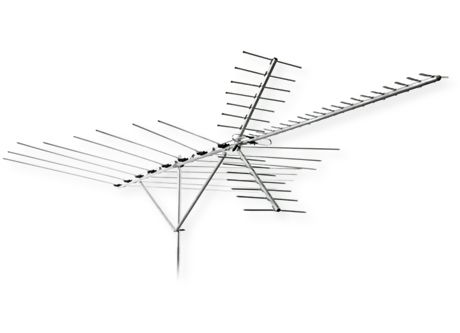
Depending on how close you are to the towers, you may not need a directional. You can get a multidirectional the size of a pizza box and mount on the side of you house. Go to http://www.antennaweb.net and punch in your address. It will tell you what type of antenna you need. Then call http://www.antennasdirect.com here in St. Louis and they'll fix you up with whatever you need. If you're in STL, you can go pick up open box returns for 30% off––plus try out a couple different models to see which works best. 
The newer style HD antennas are made to pick up the specific signals better than the old UHF antennas, but depending on where you are, you may not need it. Like digital cell phones vs. the old analog ones, there's NO static. It either works or doesn't. So you want to get the best reception possible. Mount it on the roof or outside if possible. Inside the attic mounting, kills the signal. These antennas are so small that you can put them on a small mount––I just pulled the sat dish off, and slid the antenna on. They make one that piggy backs the sat dish too. Dump that dish and save that extra money for ammo and guns. |
|
Quoted:
Hey Delorean, Just for your information, the "left" VHF side of the antenna is directional too. That antenna is called a yagi configuration. Yeah, the whole thing is......The UHF side is the end you point toward the direction of the signal. Some of those old ones are freakin huge––I have two of the medium sized ones left over. |
|
is that how it really works? You point it towards the signal? Ya no shit! You are talking to an Amateur Radio Operator from the old school that would even sometimes build what he needed. Or you should have seen some of the Antennas and Transmitters I played with while I was a Ground Radio Repair Tech (30474) in the U.S.A.F. Like can you say 10KW? Now I will admit some of the stuff you talked about as far as getting everything you want off either the air or off of the internet. Is all new to this old dog. But boy I can talk circles around your head about radio gear, and antennas.
Actually not the whole thing. The UHF part of the antenna is a corner reflector. Notice that the part that angles up and down. Those elements are all of the same length and if you did more research. All of those elements are common with the boom. If you look at the elements back behind the reflector. Some of those elements are not common with the boom. And elements that are common alternate between the left and right of the boom. A.so the elements get larger as you work your way down the boom. And the diameter of the elements effect the bandwidth of the antenna. Bigger the diameter of the elements, the wider the bandwidth.. I am just full of fun facts about antennas. But I think I have said enough now to make my point... |
|
Quoted:
is that how it really works? You point it towards the signal? Ya no shit! You are talking to an Amateur Radio Operator from the old school that would even sometimes build what he needed. Or you should have seen some of the Antennas and Transmitters I played with while I was a Ground Radio Repair Tech (30474) in the U.S.A.F. Like can you say 10KW? Now I will admit some of the stuff you talked about as far as getting everything you want off either the air or off of the internet. Is all new to this old dog. But boy I can talk circles around your head about radio gear, and antennas. Actually not the whole thing. The UHF part of the antenna is a corner reflector. Notice that the part that angles up and down. Those elements are all of the same length and if you did more research. All of those elements are common with the boom. If you look at the elements back behind the reflector. Some of those elements are not common with the boom. And elements that are common alternate between the left and right of the boom. A.so the elements get larger as you work your way down the boom. And the diameter of the elements effect the bandwidth of the antenna. Bigger the diameter of the elements, the wider the bandwidth.. I am just full of fun facts about antennas. But I think I have said enough now to make my point... WTF?!?!?! "Made your point"? Did this turn into an arguement without me knowing? 
I just installed the the thing the way it said on the box and gave the OP a basic run-down on what I learned in trying to get different antennas to work at my house. No doubt you know more about antennas than I do––is that the point you wanted to make?? Sorry if I pissed you off........... |
|
I have a 1080 Plasma with a standard non HD Dish Network receiver and to answer your question, yes the picture REALLY sucks. It's super grainy, I plan to call Dish one of these days and have them bring out an HD reciever as Direct TV from what I hear has been offering free HD upgrades to their customers this year.
Flip side though is your movies (using an HDMI cable) will look fenomonal. We always watch movies so the grainy regular TV is tolerable for the 1 hour a day I watch it. If you want to keep you current TV, do like my friend did, search youtube for instructional vids to fix yours then get the parts on ebay. He fixed something similar that was a "$800 repair" for $50 and he is someone that can't even change the oil on his own car. |