


Posted: 3/26/2010 5:00:40 PM EDT
|
I'm in Puyallup at the Northwest Motor Inn.
Having trouble connecting to their interwebz. I get the message (Intel Proset wireless) "Problem Applying Profile" I tried using the ethernet cable, but that doesn't do anything. I never have been able to connect here, and the office says I am the only one that has ever had this issue. I'm on my laptop Dell M1210 Any ideas? I am posting using the spotty internet signal from the hotel across the street. It's a weak signal though. Probably will take me 20 minutes to get enough connectivity just to send this post. Hard to surf the Craigslist Adult Classifieds with this going on............ |
|
Quoted: I'm in Puyallup at the Northwest Motor Inn. Having trouble connecting to their interwebz. I get the message (Intel Proset wireless) "Problem Applying Profile" I tried using the ethernet cable, but that doesn't do anything. I never have been able to connect here, and the office says I am the only one that has ever had this issue. <snip> You didn't fall for that old line did you?  |
|
Symptom(s): The "Problem applying Profile" error appears when trying to connect to a wireless network using an EAP-FAST profile created with Intel® PROSet/Wireless Network Connection 10.x Software. This error applies only to wireless adapters that do not support Cisco* CCXv4 extensions. These adapters are the Intel® PRO/Wireless 2200BG Network Connection and Intel® PRO/Wireless 2915ABG Network Connection. The error is displayed in an error message window and listed in the Wireless Event Viewer.   Cause: The Intel® PRO/Wireless 2200BG Network Connection and Intel® PRO/Wireless 2915ABG Network Connection do not support Cisco* CCXv4 extensions. Solution: To stop the error message, disable the EAP-FAST Enhancements (CCXv4) option in the Intel® PROSet/Wireless WiFi Connection Utility Wireless Profile Properties configuration window. 1. Click Start > All Programs > Intel PROSet Wireless > WiFi Connection Utility . 2. In the Intel® PROSet/Wireless WiFi Connection Utility main window, select the profile name and click Profiles... 3. Select your EAP-FAST profile and select Properties... . 4. Click Security Settings in the left window pane. 5. Select Disable EAP-FAST Enhancements (CCXv4) in the Wireless Profile Properties configuration window. Continue the EAP-FAST configuration process.  6. Click OK to finish. If this solution does not resolve the error, see Does Intel® PROSet/Wireless Network Connection software work with DEP? for another setting change that may be causing the error message. |
|
Quoted:
Quoted:
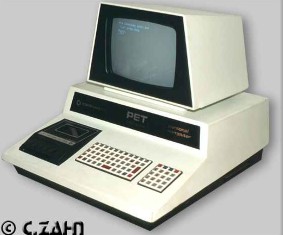
That's why I bought a Mac  I lug around a Commodore Pet and usually ask the nice hotelier for an AUI thicknet adapter cable. http://www.craphound.com/images/pet2001czahn.jpg AUI?!? That thing doesn't even have a SERIAL port! The later models used IEEE-488 to communicate with peripherals. 
|
|
Quoted:
Symptom(s):
The "Problem applying Profile" errorappears when trying to connect to a wireless network using an EAP-FASTprofile created with Intel® PROSet/Wireless Network Connection 10.xSoftware. This error applies only to wireless adapters that do notsupport Cisco* CCXv4 extensions. These adapters are the Intel®PRO/Wireless 2200BG Network Connection and Intel® PRO/Wireless 2915ABGNetwork Connection. The error is displayed in an error message window and listed in the Wireless Event Viewer. Cause:
The Intel® PRO/Wireless 2200BG NetworkConnection and Intel® PRO/Wireless 2915ABG Network Connection do notsupport Cisco* CCXv4 extensions. Solution:
To stop the error message, disable the EAP-FAST Enhancements (CCXv4) option in the Intel® PROSet/Wireless WiFi Connection Utility Wireless Profile Properties configuration window.
1. Click Start > All Programs > Intel PROSet Wireless > WiFi Connection Utility . 2. In the Intel® PROSet/Wireless WiFi Connection Utility main window, select the profile name and click Profiles... 3. Select your EAP-FAST profile and select Properties... . 4. Click Security Settings in the left window pane. 5. Select Disable EAP-FAST Enhancements (CCXv4) in the Wireless Profile Properties configuration window. Continue the EAP-FAST configuration process. http://www.intel.com/support/wireless/wlan/sb/img/eapfastsecuritysettings2.jpg 6. Click OK to finish. If this solution does not resolve the error, see Does Intel® PROSet/Wireless Network Connection software work with DEP? for another setting change that may be causing the error message. Thanks Gibby. I couldn't ever get back to the netz to see this reply. I'll be back up there next month though and give this a try. I'm back at home with my Concast wireless. Can I do it now, or will that mess up my connectivity here at home? |
|
Quoted:
Symptom(s):
The "Problem applying Profile" errorappears when trying to connect to a wireless network using an EAP-FASTprofile created with Intel® PROSet/Wireless Network Connection 10.xSoftware. This error applies only to wireless adapters that do notsupport Cisco* CCXv4 extensions. These adapters are the Intel®PRO/Wireless 2200BG Network Connection and Intel® PRO/Wireless 2915ABGNetwork Connection. The error is displayed in an error message window and listed in the Wireless Event Viewer. Cause:
The Intel® PRO/Wireless 2200BG NetworkConnection and Intel® PRO/Wireless 2915ABG Network Connection do notsupport Cisco* CCXv4 extensions. Solution:
To stop the error message, disable the EAP-FAST Enhancements (CCXv4) option in the Intel® PROSet/Wireless WiFi Connection Utility Wireless Profile Properties configuration window.
1. Click Start > All Programs > Intel PROSet Wireless > WiFi Connection Utility . 2. In the Intel® PROSet/Wireless WiFi Connection Utility main window, select the profile name and click Profiles... 3. Select your EAP-FAST profile and select Properties... . 4. Click Security Settings in the left window pane. 5. Select Disable EAP-FAST Enhancements (CCXv4) in the Wireless Profile Properties configuration window. Continue the EAP-FAST configuration process. http://www.intel.com/support/wireless/wlan/sb/img/eapfastsecuritysettings2.jpg 6. Click OK to finish. If this solution does not resolve the error, see Does Intel® PROSet/Wireless Network Connection software work with DEP? for another setting change that may be causing the error message. gIBBY IS ONe smart fucker, ain't he? Hoep it goes well with Craisglist. 
|